Ambient Sounds from Surge XT's Hidden Engines: FM, Twist and String (Free Synth Tutorial)
Five ambient sounds from Surge XT's FM2, FM3, Twist, String and S&H Noise engines, with the real settings from our Engines pack. No samples, no extra wavetables.
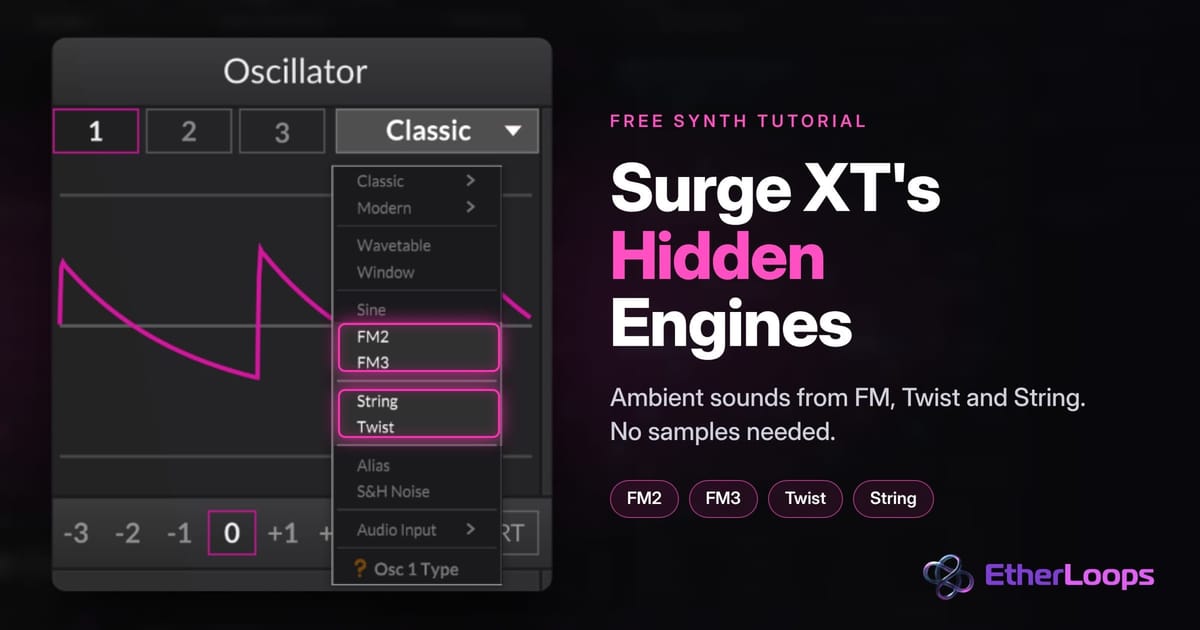
Most people open Surge XT, pick the Classic or Wavetable oscillator and never look further. That's a shame, because the oscillator menu hides a set of engines that are almost made for ambient music: two FM engines, a physical-modelling string, and Twist, a multi-engine oscillator with chords, vowels and granular clouds built in.
In this tutorial we'll build five ambient sounds from those engines, with no samples and no extra wavetables: a glassy FM pad, a soft FM bell, a Twist pad and vowel choir, a bowed String pad, and a noise "wind" layer. Every recipe is taken from a real, finished patch in our Engines pack for Surge XT, so the settings below are the ones we actually use, not guesses. Surge XT is a free, open-source synth that is ideal for ambient music, so you can follow along in any DAW. If you don't have it yet, download Surge XT for free from the official site.
Why these engines work so well for ambient
Ambient music lives on sounds that change slowly and never feel static. Sample-based pads do this by playing back a recording. The engines in this tutorial do it differently: they generate the sound in real time, so every parameter you modulate changes the tone itself, not just the volume or the filter.
- FM changes the harmonic content when you move the modulation amount. A tiny LFO on one knob is enough to make a pad shimmer.
- Twist gives you stacked octaves, chords and vowel sounds from a single oscillator.
- String reacts like a real instrument: it plucks or bows, and the tone changes in a natural, slightly unpredictable way.
And because nothing is sample-based, the patches are tiny, load instantly and never break when you move a project to another computer.
Where the engines are
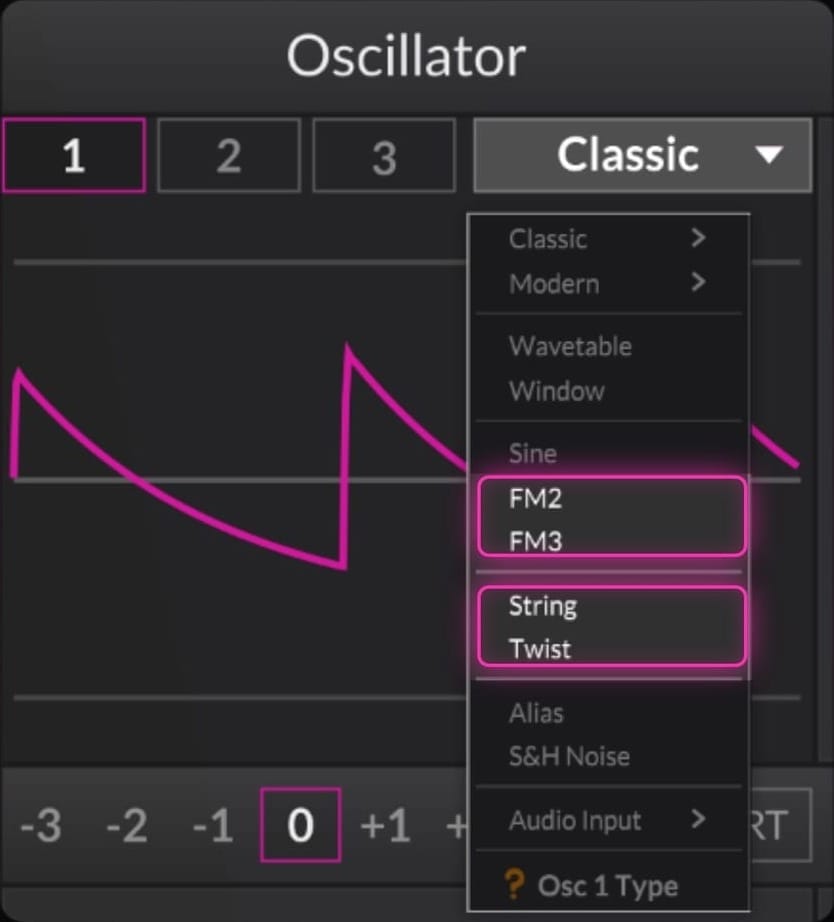
Click the oscillator type menu in Surge XT's oscillator section (it shows Classic by default). Besides Classic, Modern, Wavetable and Window you'll find:
- FM2 and FM3: a sine carrier modulated by sine modulators. Great for bells, glassy pads and soft keys.
- Twist: a multi-engine oscillator. Its first control picks the engine (Chords, Vowels/Speech, granular and more).
- String: a physical model of two strings, with a choice of short "burst" exciters (plucked) and constant exciters (bowed).
- Sine (with FM routing), Alias and S&H Noise: smaller engines that are useful for layers and texture.
Every engine shows its own set of parameters in the oscillator panel, and the labels change when you switch engines. Values are given the way Surge shows them; small differences won't matter, so use your ears.
The shared starting point
All the pads in this tutorial share one "chassis". Set this up once, save it as your own init patch, and every recipe below only changes the oscillator section:
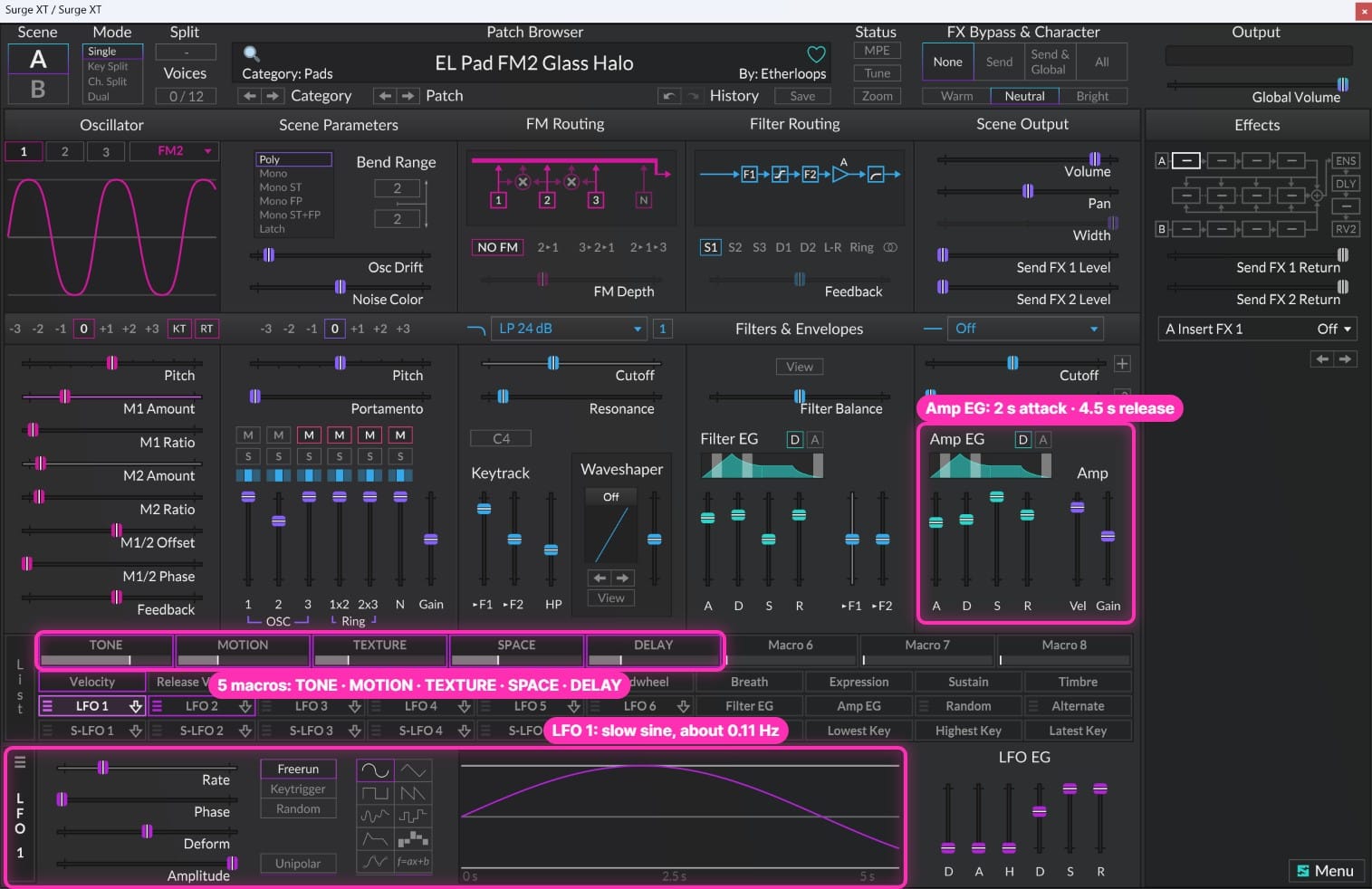
- Amp envelope: attack about 2 s, decay about 2.5 s, sustain full, release about 4.5 s.
- Filter: a low-pass, starting quite closed (around middle C). A macro called TONE opens it up across a wide range, and a little velocity on the cutoff makes harder notes slightly brighter.
- Two slow LFOs: LFO 1 is a sine at about 0.11 Hz, LFO 2 a triangle at about 0.07 Hz. Because the rates don't line up, the movement never sounds like an obvious loop.
- Macros: TONE (filter), MOTION (speeds up both LFOs), TEXTURE (the "character" control, different in each patch), SPACE and DELAY (effect amounts).
- Effects: Ensemble → tempo-synced Delay with low feedback (about 15%) → Reverb 2 with a long decay (around 7 s).
With this chassis in place, the engine is the only thing that gives each sound its personality.
1. Glassy FM pad (FM2) — from "EL Pad FM2 Glass Halo"
FM synthesis in Surge XT gets a bad reputation for harsh 80s sounds, but with low modulation and slow envelopes it gives you some of the cleanest, most "expensive" pad tones you can get from a free synth. Glass Halo uses two FM2 oscillators an octave apart.
- Oscillator 1: FM2. M1 Ratio 2, M1 Amount about 22%. M2 Ratio 3, M2 Amount about 8%. A small M1/2 Offset (0.6) adds a slow beating, and Feedback stays almost off (5%).
- Oscillator 2: FM2, one octave up, at about 70% level. M1 Ratio 1 at 12%, M2 Ratio 4 at 5%, with a small negative offset (−0.4) so it beats against Oscillator 1.
- Movement: LFO 1 gently moves Oscillator 1's M1 Amount; LFO 2 moves Oscillator 2's M2 Amount. The overtones now drift independently in the two octaves.
- TEXTURE macro: raises the M1 and M2 amounts on both oscillators. Turn it up and the pad gets glassier and brighter; turn it down and it becomes an almost pure sine pad.
- Use the shared chassis for the envelope, a 24 dB low-pass filter and the effects.
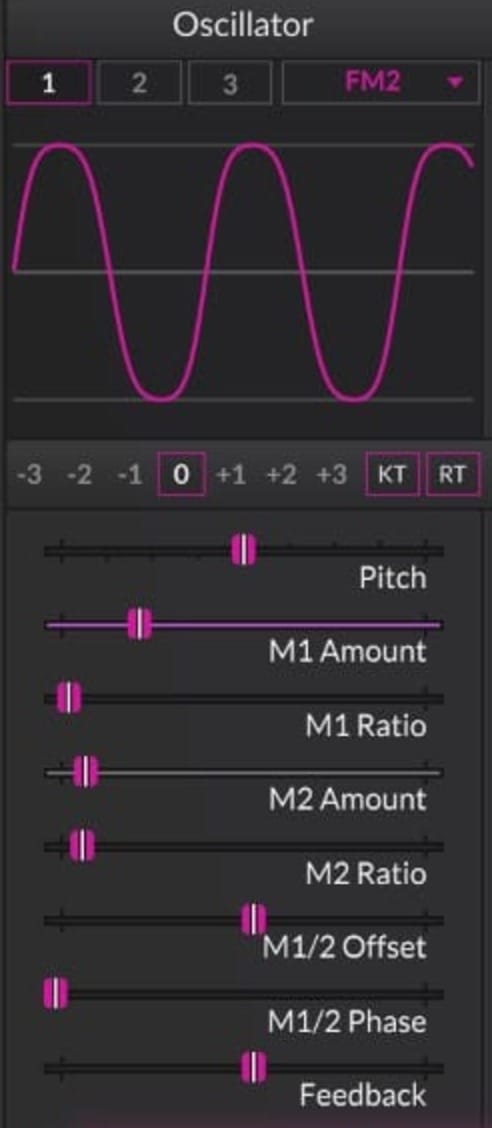
Ratios matter. Whole-number ratios (1, 2, 3, 4) sound harmonic and musical, which is why every pad in the pack uses them. Odd or fractional ratios sound metallic and clangy: great for gongs and SFX, risky for pads that have to sit under chords.
Tip: the modulation amount is your brightness control. Map it to a macro, as Glass Halo does with TEXTURE, and you can open the pad during a build without touching the filter.
2. Soft FM bell (FM3) — from "EL Bell FM3 Frost Chime"
FM3 adds a third modulator and is ideal for bells, mallets and soft keys. In ambient tracks these work as a sparse top layer: a few notes every bar, drifting in a long delay.
- Oscillator 1: FM3 on its own (Oscillators 2 and 3 muted). M1 Ratio 4 at about 15%, M2 Ratio 3 at about 8%. M3 and Feedback stay at zero.
- The bright attack: the filter envelope also modulates the M1 and M2 amounts. It decays in about 0.15 s, so each note starts with a glassy "strike" that quickly softens into a rounder tone.
- Amp envelope: instant attack, no sustain, a short decay and release (around 0.2 s). A DECAY macro stretches the length from a short tick to a long ring.
- Filter: a 12 dB low-pass with TONE on the cutoff and velocity, so harder notes ring brighter.
- Effects: Chorus instead of Ensemble, then the same Delay and Reverb 2.
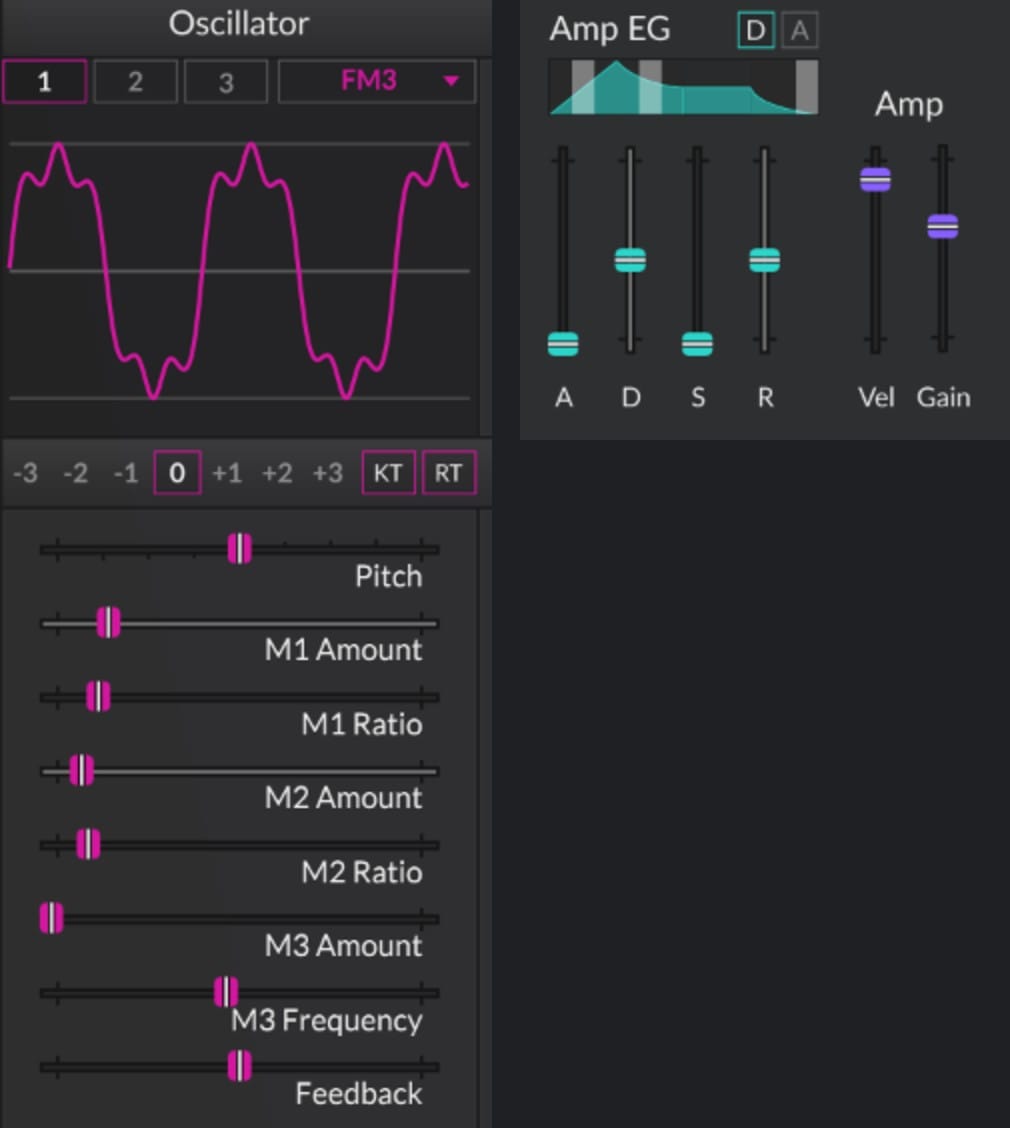
Why ratios 4 and 3 instead of something more "bell-like" and inharmonic? Because harmonic ratios keep the bell in tune with any chord you play underneath it. For an ambient top line, that matters more than a realistic bell spectrum. Play a few notes from the pentatonic scale over the FM pad and you'll hear how quickly a simple bell line turns a pad into music.
3. Twist pads: octaves and a vowel choir — from "Chord Bloom" and "Vowel Drift"
Twist is based on a well-known Eurorack macro-oscillator and has many engines inside one oscillator. Two of them are great for ambient: Chords and Vowels/Speech.
Chord Bloom (Chords engine)
- Oscillator 1: Twist, engine set to Chords.
- Set Harmonics almost fully down (about −0.94). At this end of the range the Chords engine plays stacked octaves instead of a full chord, so every key plays only its own note. Your chords stay exactly as you play them, with a rich, organ-like voicing.
- Set Timbre fully up for the brightest, most open voicing, and leave Aux Mix fully down.
- Put Morph slightly below the middle (−0.25) and modulate it with LFO 1 and the TEXTURE macro. The colour of the stack now changes slowly while you hold a chord.
- Use the shared chassis with a 24 dB low-pass.
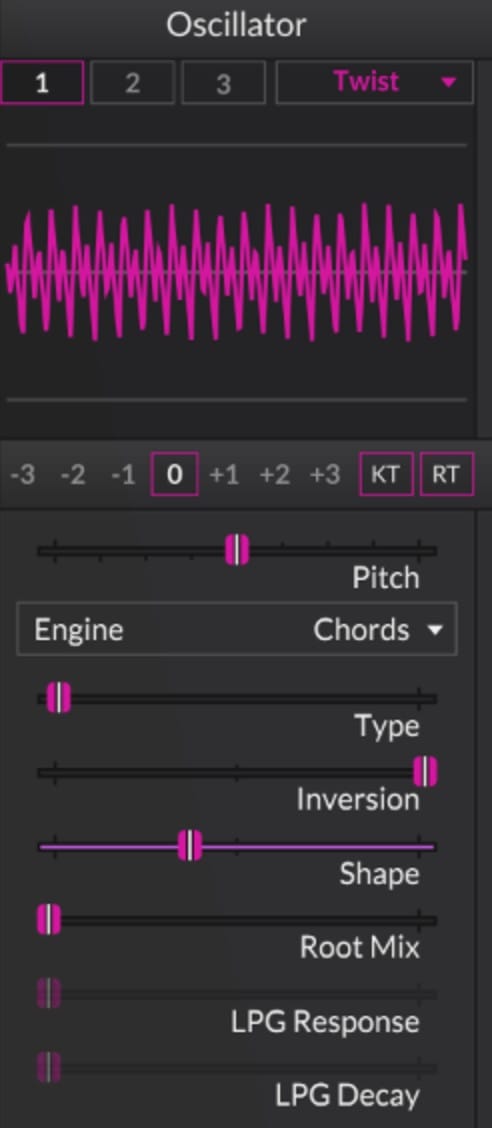
Want the classic "one finger plays a whole chord" sound instead? Simply turn Harmonics up: higher settings switch the engine to real chord types. It's great for drones, but be careful when you also play chords with your hands, as the notes will clash.
Vowel Drift (Vowels/Speech engine)
- Oscillators 1 and 2: both Twist on the Vowels/Speech engine. Oscillator 2 sits at about 85% level.
- Give the two oscillators different settings: Oscillator 1 with Harmonics −0.4, Timbre −0.2 and Morph −0.4; Oscillator 2 with all three at +0.2. They now sing slightly different "vowels".
- Modulate Morph on Oscillator 1 with LFO 1 and on Oscillator 2 with LFO 2, both at about half depth. Morph scans through the vowels, and because the two LFOs run at different speeds, the two voices never move together.
- Put TEXTURE on both Timbre controls for a darker or brighter choir.
- Use a softer 12 dB low-pass filter and the shared effects.
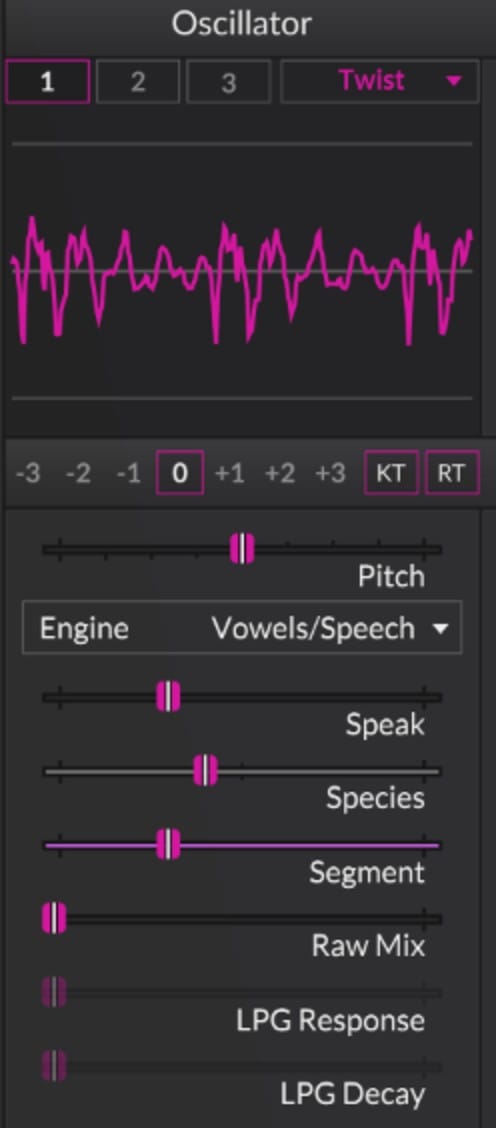
The result is a ghostly choir that never settles. Keep it quiet behind the other layers: it should be felt more than heard.
4. Bowed String pad — from "EL Pad STR Bowed Mist"
The String engine is a physical model of two strings. With a burst exciter it plucks; with a constant exciter it behaves like a bowed string, which is perfect for slow, organic pads.
- Oscillator 1: String, with one of the constant exciter modes, so the strings are driven for as long as you hold the key.
- Exciter Level about 55%, both string decays high (about 0.90 and 0.88), so the tone sustains.
- String 2 Detune about 0.12, gently moved by LFO 1. The two strings beat against each other and the beating speed slowly changes.
- Stiffness slightly negative (−0.2) for a softer, more wooden tone.
- TEXTURE moves both Exciter Level and Stiffness: more "bow pressure" and a brighter string when you turn it up.
- Oscillator 2: a plain Sine one octave down at about 63% level. This gives the physical model a solid, warm foundation that it doesn't have on its own.
- Shared chassis with a 24 dB low-pass.
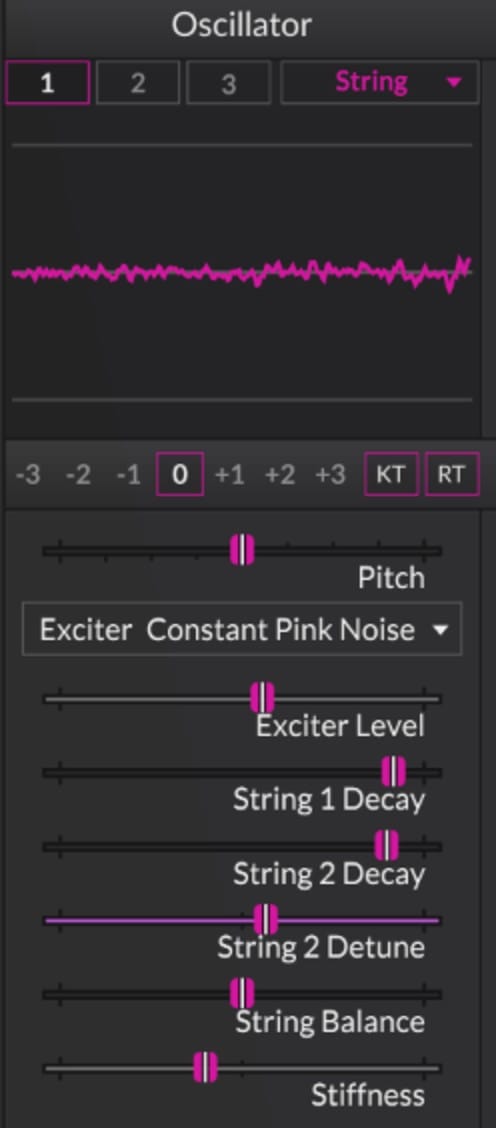
Plucked variation (from "EL Pluck STR Glass Koto"): switch the exciter to a burst mode (Glass Koto uses a sine burst at full level), keep the string decays around 0.9, and tune the two strings almost together (detune about 0.02). Use an instant attack, a 2-second decay and no sustain. You get a clean, glassy koto pluck that is great for slow arpeggios.
5. Wind and air (S&H Noise) — from "EL SFX SNH Night Wind"
Real ambient recordings always have some "air": room tone, tape hiss, wind. Night Wind builds a convincing wind from nothing but noise.
- Oscillator 1: S&H Noise.
- Filter: a 12 dB band-pass, centred around 750 Hz, with resonance at about 40%.
- The gusts: LFO 1 on the Noise shape at about 0.3 Hz sweeps the band-pass cutoff by about two octaves. Because the shape is random, the gusts never repeat.
- A CHAOS macro adds resonance for a more whistling, howling wind.
- Effects: a Frequency Shifter for a slightly unreal, swirling quality, then the usual Delay and Reverb 2.
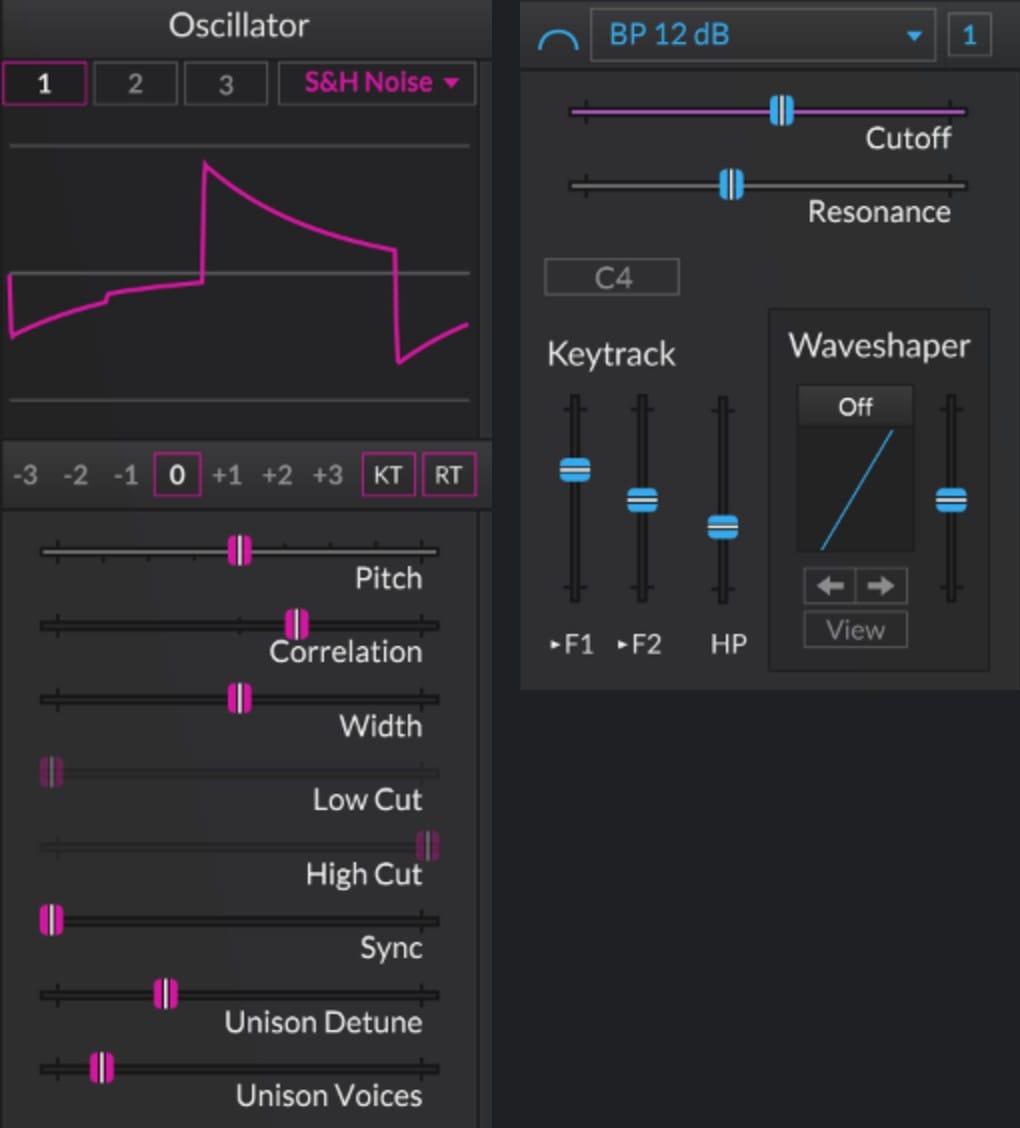
In a track, keep this layer very low, so you only notice it when it's muted, and roll off everything below a few hundred Hz. It makes digital pads feel like they were recorded in a real space.
Modulation: what the pack's patches have in common
Look at all the patches above and you'll see the same modulation rules again and again:
- Two slow LFOs at different rates (about 0.11 Hz and 0.07 Hz). They line up only rarely, so the sound keeps changing for minutes without an obvious loop.
- Small depths. Most LFO amounts are between 5% and 20%. Ambient modulation should be felt more than heard. If you can clearly hear the sweep, halve the depth.
- Random shapes for natural movement, like the Noise LFO in Night Wind.
- Envelopes on the tone, not just the volume, like the filter envelope on the FM amounts in Frost Chime.
- Named macros. TONE, MOTION, TEXTURE, SPACE and DELAY are on the same controls in every patch, so you can automate them in your DAW without opening the synth.
Common mistakes to avoid
- Too much FM amount. If a pad sounds harsh or buzzy, the modulation is too high. The pad patches above all stay below about 25%.
- Feedback turned up. FM feedback adds grit fast. Keep it at or near zero for pads.
- Inharmonic ratios on pads. They sound great on their own and terrible under chords. Keep them for gongs and effects.
- Static patches. Without slow modulation, even a beautiful sound gets boring in ambient music after 30 seconds.
- Muddy low end. Several long-release layers with reverb build up below 200 Hz. Cut the lows on everything except one layer.
- Delay feedback too high. The pack keeps delay feedback low (about 15%) and lets the long reverb do the rest.
Quick FAQ
Do I need the paid version of anything? No. Surge XT is completely free and open-source and runs on Windows, macOS and Linux as VST3, AU, CLAP and standalone.
Does this work in my DAW? Yes. Everything happens inside Surge XT, so it works the same in Bitwig, Ableton Live, FL Studio, Logic, Reaper or any other DAW that loads plug-ins.
What are the "hidden engines" in Surge XT? Besides the Classic, Modern, Wavetable and Window oscillators, Surge XT has FM2 and FM3 (FM synthesis), Twist (a multi-engine oscillator with chords, vowels and granular modes), String (physical modelling), Sine, Alias and S&H Noise. You find them all in the oscillator type menu.
Will these patches use a lot of CPU? FM and Twist are light. The String engine is a little heavier, so if you use many voices, freeze or bounce the track once you're happy with it.
Get the finished patches
Every sound in this tutorial comes from Engines — Surge XT Edition, a bank of 64 Surge XT ambient presets built entirely from Surge XT's own engines: FM2, FM3, Twist, String, Sine FM, Modern, Alias and S&H Noise. It has 12 pads, 8 drones, 9 plucks, 9 keys and bells, 8 leads, 10 basses and 8 SFX, all with the same TONE / MOTION / TEXTURE / SPACE / DELAY macros. Every patch name tells you which engine it uses (FM2, FM3, TWS, STR, SNH and so on), so you can open any of them and see exactly how it's built.
If you like wavetable sounds more, Slow Forms — Surge XT Edition has 75 Surge XT patches built on the Slow Forms wavetables. Both need Surge XT 1.3.4 or later.
Want both? Get the Surge XT Bundle: Slow Forms and Engines together for $25.
New to Surge XT? Start with How to Build a Lush Ambient Pad in Surge XT.