How to Arrange an Ambient Track Before You Write a Single Note (Bitwig Walkthrough)
Your loop never becomes a track because the arrangement never gets built. Here's how to lay out a full four-minute Bitwig arrangement before writing a note.
It's the same eight bars again.
The pad is beautiful. The sub sits right. You've got a delay throw that genuinely surprised you. You loop it, and loop it, and loop it — and forty minutes later you're still inside bars 1 to 8, adding another layer to a thing that has nowhere to go.
You don't have an ideas problem. You have an arrangement problem.
Ambient, psybient and downtempo are punishing this way. The genres are built on patience — a texture that takes ninety seconds to open, a bass that doesn't arrive until the second minute, a breakdown that removes almost everything and still holds attention. None of that lives in a loop. It lives in the shape of the whole track, and the shape is the part almost nobody sketches before they start.
This post is about flipping the order: build the arrangement first, empty, then write into it. We'll do it end to end — a four-minute psybient track, from a blank browser tab to a laid-out Bitwig Studio project — using a tool I built called Trellis.
Why arrangement is the real bottleneck
1. The loop is a trap that feels like progress
Looping eight bars gives you constant feedback. Every layer you add sounds immediately better, so the session feels productive right up to the moment you close it. Arranging gives you no feedback at all until the structure exists — which is exactly why it keeps getting postponed to "later," and later never comes.
2. Structure is genre knowledge, not taste
Ask a producer what a psydub track does, and you'll get a shrug. Ask them to name the sections, and you'll get "intro, some stuff, breakdown, end." But the genres are far more specific than that. Psydub runs Intro → Bass & Skank Entry → Build / Layering → Peak / Dub Drop → Breakdown (Dub Echo) → Outro, and the dub echo breakdown behaves nothing like a downtempo breakdown, which strips almost everything out. Classic ambient doesn't have a breakdown at all.
That's learnable knowledge. It's just knowledge most of us pick up by accident, over years, one track at a time.
3. Sketching structure inside a DAW is expensive
To rough out a four-minute arrangement by hand, you create tracks, name them, color them, drag empty clips across a timeline, place markers, then move all of it a phrase left when you change your mind. It's twenty minutes of admin to answer a question you wanted to answer in thirty seconds. So you don't ask the question, and you go back to the loop.
The fix: a scaffold you can see
Trellis is a single HTML file that runs in your browser. You describe a track — genre, length, intensity — and it writes a .dawproject file you open in Bitwig Studio with sections, tracks, clips, and markers already laid out.
Two things make it work, and both are worth understanding before you touch it.
A genre configures the whole arrangement in one click. There are eighteen of them across four families — Ambient, Chill / Electronic, Psy / IDM and Wellness — and they're not eighteen labels on one template. Pick Psydub and you get its six sections, its six tracks, its tempo and a clip layout that matches how the genre actually moves. Pick Sleep Music and you get five sparse sections at 50 BPM.
The clips are deliberately empty of music. Every clip holds one repeated C, at a density that shows how busy the part is. That sounds like a limitation until you use it. The point is to see the arrangement — where it thickens, where it breathes — without being distracted by generated notes you'd delete anyway. The real music gets written in Bitwig, where you can hear it.
The walkthrough: a four-minute psybient track
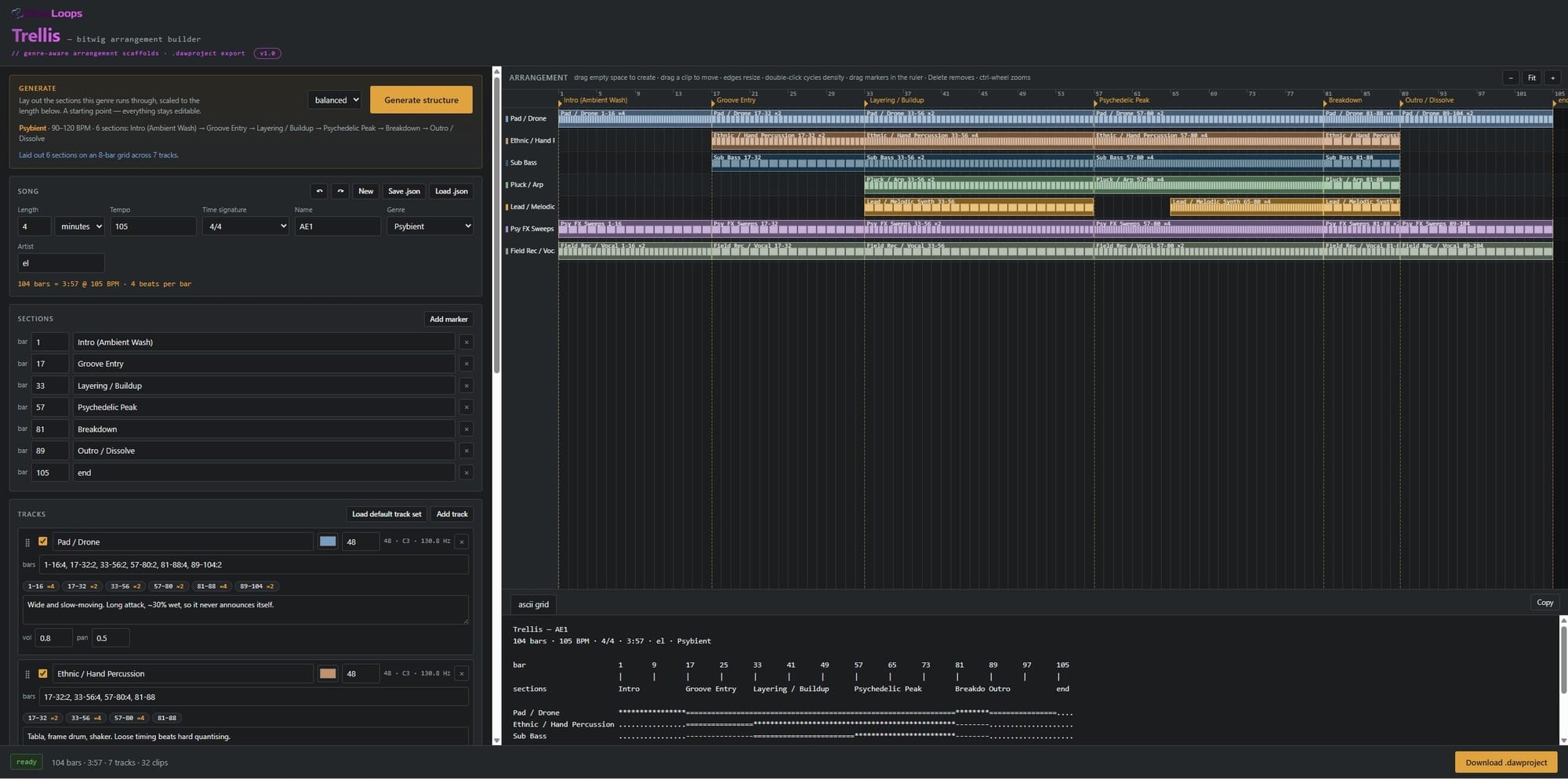
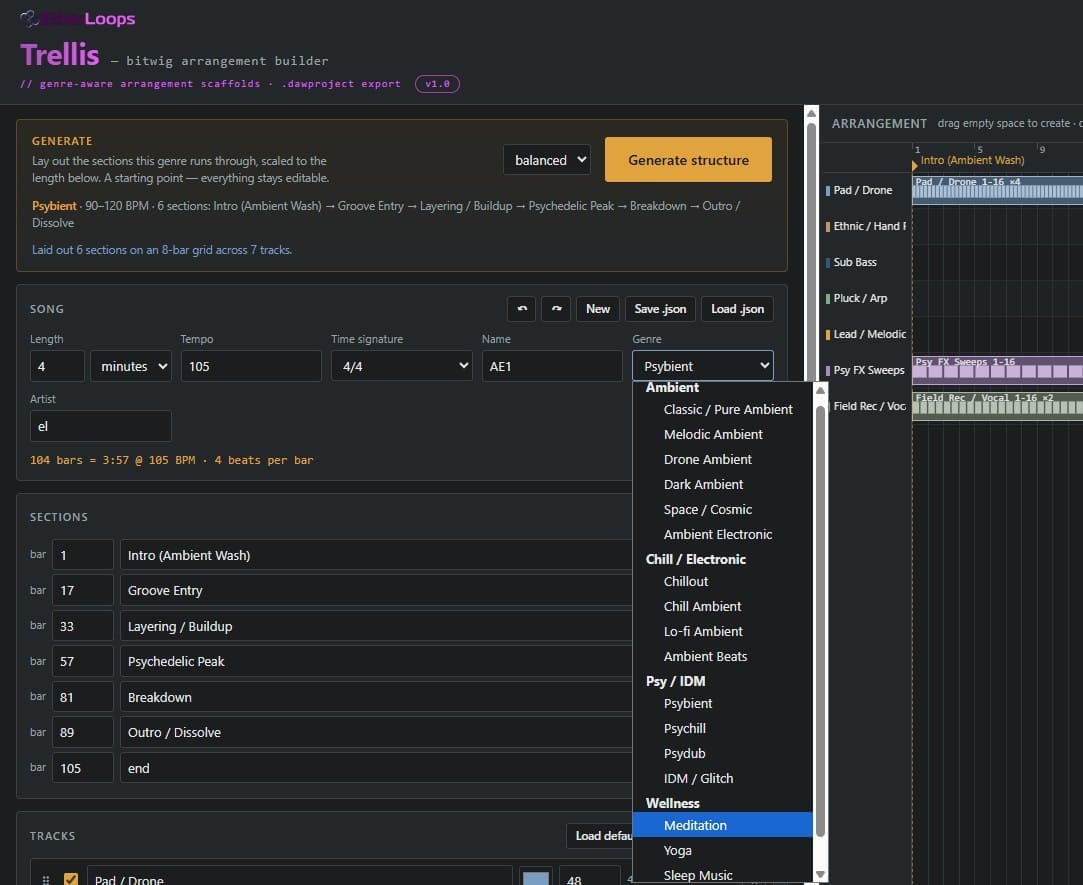
Open trellis.html. There's no installer, no account, no network request — it runs from your disk and works on a plane. The window splits in two: the form on the left, a live arrangement view on the right, and a footer with the length, a status badge and the download button.
Step 1 — Pick the genre
Choose Psybient. The tempo jumps to 105 BPM, the middle of the genre's 90–120 range, and a line tells you exactly what it's about to build:
Psybient · 90–120 BPM · 6 sections: Intro (Ambient Wash) → Groove Entry → Layering / Buildup → Psychedelic Peak → Breakdown → Outro / Dissolve
Read that chain before you press anything. It's a free lesson in the genre, and it's the part you'd otherwise be guessing at.
Step 2 — Set the length in minutes
Type 4 and switch the unit to minutes. Trellis converts using the tempo and snaps to a multiple of 8 bars so phrases divide evenly — at 105 BPM in 4/4 that lands on 104 bars. The line under the field always shows exactly what you got: 104 bars = 3:57 @ 105 BPM · 4 beats per bar.
The snapping matters more than it looks. An arrangement on a clean 8-bar grid is one you can move things around inside later without everything landing off-phrase.
Step 3 — Choose an intensity
gentle · balanced · intense. This shifts every clip's density one step softer or busier and leaves the structure alone. Start on balanced — you'll compare the other two in a moment.
Step 4 — Press Generate structure
One click lays out the sections, the genre's track list and every clip. The right-hand panel fills with coloured blocks.
Now do the thing most people skip: press it again on gentle, then again on intense. It's one click each and it takes ten seconds, and surprisingly often one of the three is simply right. Every generate is a single undo step, so Ctrl+Z puts back whatever it replaced.
Step 5 — Read the arrangement, don't just look at it
This is the whole point of the exercise, so slow down here.
One row per track, bars across the top, section markers as flags in the ruler with dashed lines running down through the rows. Each clip is labelled like Pad / Drone 33-48 ×2, and the note divisions are drawn inside it — so a sustained block and a busy one are obvious from across the room.
Ask three questions:
- Does the entrance order feel right? In psybient the groove arriving at bar 17 versus bar 25 is the difference between a track that moves and a track that floats.
- Where does it breathe? Find the thinnest column in the picture. That's your breakdown, and if it isn't thin enough to look uncomfortable, it won't feel like relief.
- Does the outro answer the intro? Several genres return to the intro texture at the end. That return is what makes the peak feel like a journey rather than a wall.

Step 6 — Drag it to taste
Everything in that panel is editable, and it all snaps to whole bars:
- Drag empty space on a row to create a clip
- Drag a clip to move it, or its edge to resize
- Double-click a clip to step its density through the allowed values — 1, 2, 3, 4, 6, 8, 16 notes per bar
- Click, then
Deleteto remove one - Drag a marker along the ruler to move a section boundary
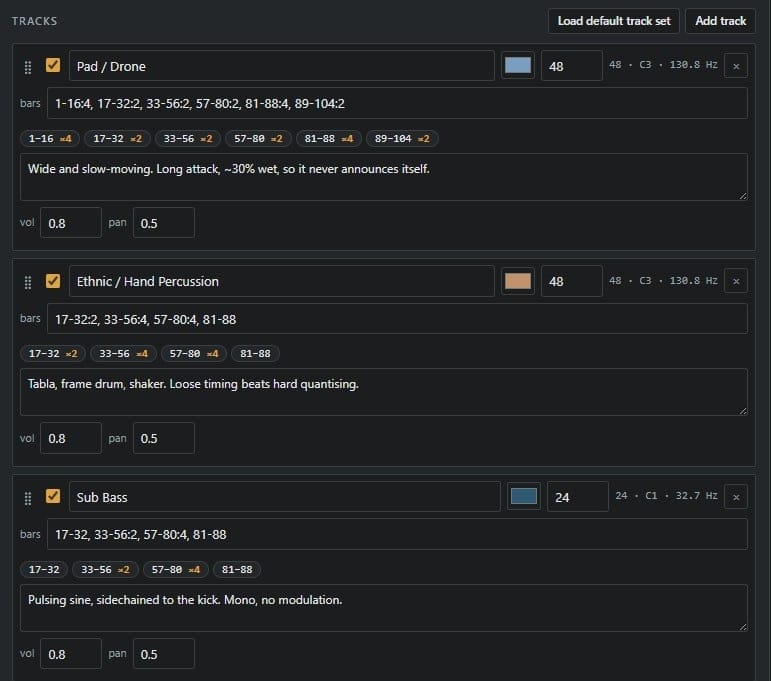
Ctrl + wheel zooms, plain wheel pans, 0 fits the whole song. If you'd rather type than drag, every track has a spans box that takes comma-separated ranges — 1-32, 33-48:2, 65-88:4 — where the number after the colon is the density.
Step 7 — Make the tracks yours
Rename the tracks to match your own template before you finish — clips and notes follow the name, so do it before the final generate rather than after.
Each track carries a MIDI key shown with its note name and frequency (48 · C3 · 130.8 Hz), following a register convention: 24 for sub bass, 36 for bass and kick, 48 for pads and percussion, 60 for textures and keys, 72 for leads, 84 for FX tails. Everything is a C so the grid stays readable, and the octave carries the meaning.
Then there's the field that does the most work: the production note under each track. Whatever you write there lands in Bitwig's track inspector, which makes it the one piece of guidance that survives the trip into the DAW. Trellis pre-fills it per genre — the psydub echo track gets "Tape delay with the feedback automated. This is the genre's voice." — and keeps anything you write over the top.
Use it properly. "Analog-style pad, slow filter open across the whole intro" written now is worth an hour of remembering later.
Step 8 — Download and open in Bitwig
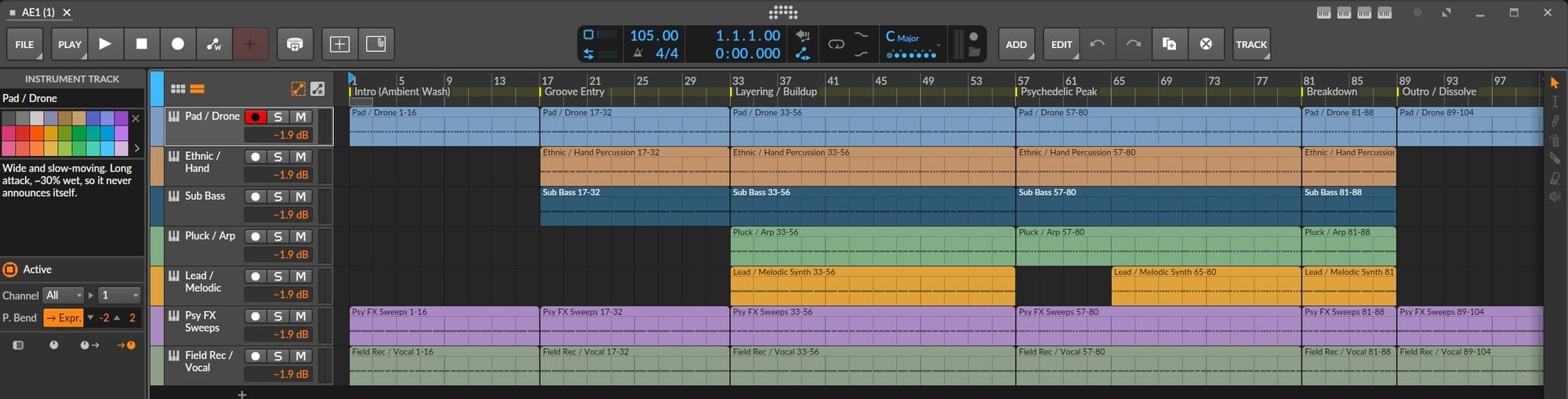
The footer badge reads ready when the arrangement is valid, or 3 problems when it isn't — and download stays disabled until it's clean, with each problem written in red next to the field that caused it. Press Download .dawproject (or Ctrl+Enter), then in Bitwig choose File → Open.
What arrives, and what doesn't
Worth being straight about this, because one of these surprises people.
What arrives: your tracks with names, colors and order plus a Master track; every clip with its notes in the right place; tempo and time signature; section markers on Bitwig's timeline; mixer volume, pan and routing; and your production notes in each track's inspector.
What doesn't: instruments. Bitwig's importer discards instrument data from .dawproject files, so every track arrives empty. That's how the importer works — verified against Bitwig 6.0.11 — and it's not something a file can fix. It's precisely why the instrument suggestion goes into the production note instead, where it survives the import.
Modulators don't arrive either, and no tool can change that. No API can create them — not this format, not Bitwig's own controller API. Wiring an LFO to a cutoff stays a manual step.
So the first five minutes in Bitwig are: load your instruments track by track, reading each production note as you go. Then the scaffold is live and you're writing music into a track that already knows its own shape.
Density is your dynamics axis
One concept to take away even if you never touch the tool.
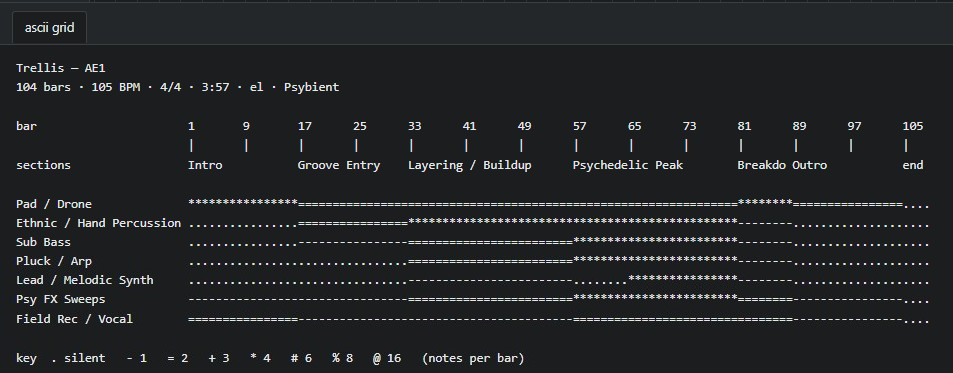
Density — notes per bar — is what stops an arrangement from being a flat block of "on" and "off." Sustained in the intro, halves through the groove entry, quarters at the peak, back to sustained in the outro. Without it, every section looks identical in the timeline, and a section that looks flat in the preview will feel flat in the DAW.
Trellis also renders the whole track as plain text you can paste into your notes, one character per bar, with the character carrying the density:
bar           1       9       17      25      33
              |       |       |       |       |
sections      Intro           Groove Entry    Layering
Pad / Drone   ****************================================
Sub Bass      ................----------------================
Silent is ., one note per bar is -, two is =, four is *, up to @ for sixteen. I use it as a work order — paste it in, tick sections off as they get written.
A few things I'd do differently the second time
- Let the genre do the first 80%. Eighteen exist so you don't have to reason about section proportions from scratch. Generate, then edit — don't start from an empty song and build up.
- Watch the breakdown. It's the most genre-revealing section in the whole map, and the one most worth adjusting by hand.
- Save a preset per project type, not per project. "4-minute psydub" is worth keeping. "track 37" isn't.
- Save a
.jsonfor anything you'd be sorry to lose. Presets and autosave both live in your browser, and clearing your browsing data clears them without warning.Ctrl+Swrites a real file to disk — that's the copy you actually own.
Frequently asked questions
Do I need Bitwig Studio? Trellis is built and tested against Bitwig Studio 6. .dawproject is Bitwig's open interchange format and other DAWs support it to varying degrees — tracks, clips, markers and tempo are standard parts of the format and should travel — but Bitwig is the one it's tested on.
Do I need an internet connection? No, never. Trellis makes no network requests at all, on first load or afterwards. Everything, including the file it writes, is produced in your browser.
Why is every clip just one repeated note? Because the arrangement is the deliverable, not the music. A skeleton you can see is more useful than generated notes you'd delete.
I changed the genre and nothing happened. Changing the genre sets the tempo and updates the description, but it doesn't rebuild anything until you press Generate structure — otherwise browsing the list would throw away your edits.
Generate wiped my clips. It replaces sections and all clips by design. One Ctrl+Z restores them, and colors, keys, and notes on tracks whose names match are always preserved.
My song is 100 bars but Generate made it 96. Sections snap to multiples of 8 so phrases divide evenly. The length field updates to show what it changed to.
Can it open a .dawproject I already have? No — it writes them, it doesn't read them. Use Load .json to reopen your own Trellis work.
Start with the shape
The loop isn't the hard part. You already make good loops — that's why there are forty of them in your projects folder.
The hard part is the ninety seconds before the groove arrives and the ninety seconds after the peak leaves, and those only get built when the arrangement exists before the music does. Thirty seconds of describing, one download, and the empty timeline is no longer empty.
→ Get Trellis at shop.etherloops.com — one HTML file, 18 genres, no subscription and no account. Includes the full user manual as a PDF.
EtherLoops builds production tools for ambient, chill, and atmospheric music makers. Browse more at etherloops.com.