How I Built a 5-Minute Ambient Track in Bitwig Studio — Every Device Setting from AE1
Three fields in Trellis built the 120-bar skeleton. Then five instruments by hand. Here is the full AE1 build, every value included.
It's the same eight bars again. The pad sounds good. The bass sits nicely under it. You've spent two hours on the filter envelope and it is, objectively, a better filter envelope than it was at the start of the evening.
And the project is still eight bars long.
Every ambient producer I know has a folder of these. Beautiful loops that never became anything, because the moment you finish the sound design you're staring at an empty timeline and the question "okay, so what happens at bar 33?" is a much harder question than "should this be a low-pass or a band-pass".
This post is the full build of a track called AE1 — 90 BPM, E minor, 120 bars, five minutes twenty. I'm recording the video version of this build, and this is the written companion: every device, every value, in one place, so you can pause the video and just read the numbers instead of squinting at my screen.
The order matters more than any single setting. The arrangement got built first, before a single instrument was loaded — three fields and one click in Trellis, the arrangement builder I wrote for exactly this problem, then filled in by hand over the rest of the session.
Why the arrangement is the part that never gets built
1. The blank timeline problem
An empty arranger gives you no constraints, and sound design gives you infinite ones. Given the choice between an open question and a closed one, everybody picks the closed one. So you tweak. It feels like work because it is work — it's just not the work that finishes tracks.
2. You can't hear a structure that doesn't exist yet
"Should the drums come in at 9 or 17?" is unanswerable in the abstract and obvious the moment you can hear both. But hearing both means having 32 bars of something already in the timeline, which means building the arrangement before you have the sounds — which feels backwards, so nobody does it.
3. Section boundaries are the only thing an ambient track has
In a genre with no chorus, no drop and no vocal, the entrances and exits are the composition. A pad that's been running since bar 1 does nothing. A pad that's been running since bar 1 and is suddenly the only thing left at bar 65 does everything. That's an arrangement decision, and it costs nothing to make it before you've designed a single sound.
What I actually told Trellis
Three fields. That's the entire input.
- Genre: Chill Ambient.
- Length: 120 bars.
- Tempo: 90, typed over the 83 the genre suggested.
Intensity stayed on balanced, which is the default. Then one click on Generate structure.
I want to be precise about that, because "I described the track and it built it" would overstate what happened and understate the interesting part. I did not choose the sections. I did not choose the tracks. I did not decide that the drums should enter eight bars after the bass, or that the breakdown should have no drums at all. All of that came out of the genre.
Genre isn't a label, it's a structure
This is the bit that took me longest to get right when I was building the thing. In most tools a genre picker changes some presets. In Trellis it selects an entire arrangement map — a section list, a track list, and a density curve saying how busy each track is in each section.
Chill Ambient sits in the Chill / Electronic family, which runs the Downtempo map. That map is six sections — Intro (Pads + Field Rec), Beat-In, Main A, Breakdown, Main B (Peak), Outro — and seven tracks: Pad / Atmosphere, Drums, Bass, Keys / Chords, Lead / Melody, Sample Chops / FX, Field Recordings. Every track name, every colour, every section boundary in the screenshots further down this page came from that map, not from me.
Pick Psydub instead and you get six completely different sections with a dub echo track that stays loud through the breakdown. Pick Sleep Music and you get five sparse sections at 50 BPM. There are eighteen genres and they are not one template wearing different hats — the shapes are genuinely different, and they're drawn from published arrangement research rather than from my taste.
So the honest description of what I did is: I picked a shape I trusted and let it make the structural decisions I'd otherwise have spent an hour avoiding.
What Trellis generated
One click produced a .dawproject file. Bitwig opens it with File → Open — no plugin, no installer, no controller extension. What lands in the timeline:
- Seven tracks, named and coloured, in the genre's order, plus a Master
- Six section markers on Bitwig's timeline, plus an
endmarker one bar past the last - Every clip, split at the section boundaries and staggered so entries don't collide, each named by the bars it occupies
- A production note per track, written into Bitwig's track inspector — which turns out to be the only guidance that survives the import at all
- Tempo, time signature, and mixer volume and pan
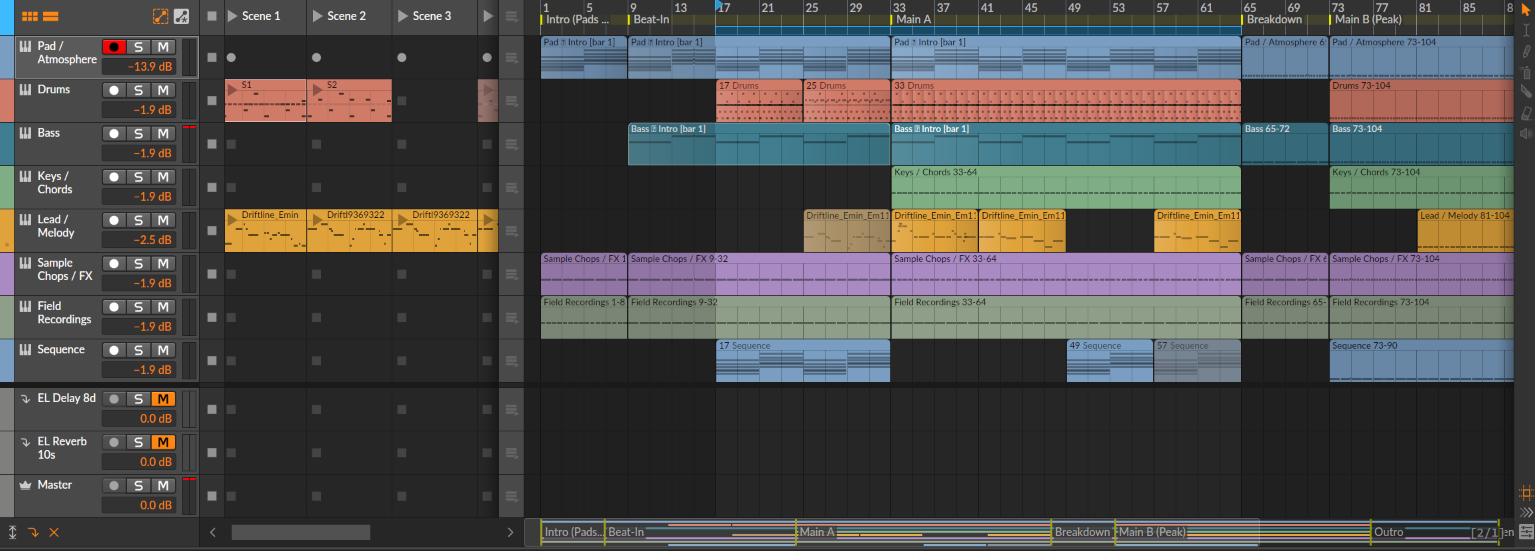
What the clips do not contain is music. Every clip holds one repeated C, at a density that shows how busy that part is in that section — sustained whole notes in the intro, quarters at the peak. That's a deliberate design decision and I'd defend it: the arrangement is the deliverable, and a skeleton you can read at a glance is worth more than generated notes you'd delete anyway. You can see it in the screenshot below on Keys / Chords, Sample Chops / FX and Field Recordings — those three still have their placeholder content, because I haven't written them yet.
Here's what came out for AE1:
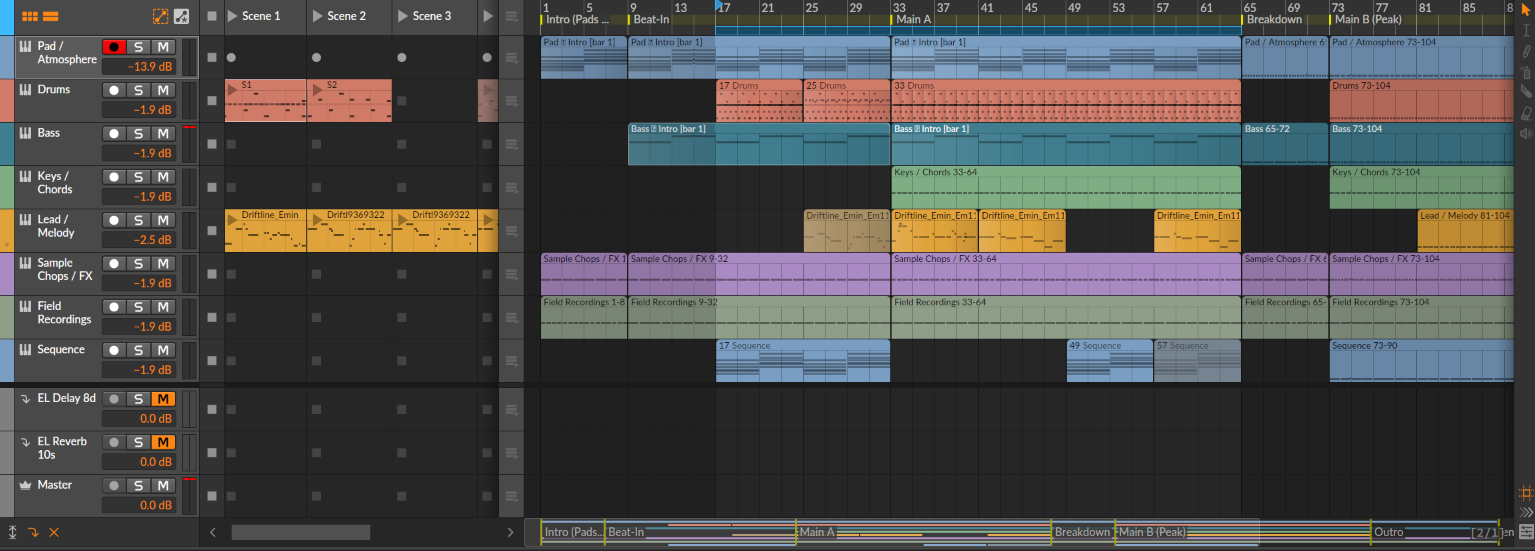
Section markers landed at bar 1 (Intro / Pads), bar 9 (Beat-In), bar 33 (Main A), bar 65 (Breakdown), bar 73 (Main B / Peak) and bar 105 (Outro), with the end marker at 121. Every clip is named by the bars it occupies, which sounds trivial until you're 40 clips deep and trying to work out which one you're editing.
And the entries and exits are staggered, which is the part I'd have got wrong by hand:
- Bars 1–8 — Pad, Sample Chops / FX and Field Recordings only. No pulse at all.
- Bar 9 — Bass enters. Still no drums.
- Bar 17 — Drums and Sequence enter together, eight bars after the bass, so the groove arrives in two stages instead of one.
- Bar 25 — first Lead phrase, eight bars before Main A, so the melody pre-announces the section.
- Bar 33 — Keys / Chords enter and everything is running.
- Bars 65–72 — Breakdown. Drums, Keys, Lead and Sequence all drop out. Pad, Bass, Sample Chops and Field Recordings hold.
- Bar 73 — Main B. Everything returns except the Lead, which waits until bar 81.
- Bar 105 — Outro.
One track in that screenshot isn't Trellis's: Sequence. The Downtempo map builds seven tracks and I wanted an eighth, so I added it in Bitwig after the import and drew its clips by hand — 17–32, 49–56, 57–64 and 73–90, with 57–64 deactivated because I muted it while working on the Lead and never turned it back on.
Which is the workflow working as intended, rather than a limitation. The generated skeleton is a starting point, not a contract. What it bought me was that I was making a real decision about where a sequence should sit — with seven other tracks already playing around it — instead of staring at an empty timeline trying to invent all eight at once.
Why generate this instead of dragging clips
I could have built that timeline by hand. I've done it plenty of times. It takes somewhere between forty minutes and an hour of clip-dragging, duplicating, renaming and nudging boundaries — and every one of those minutes is spent on data entry, not on decisions.
The cost isn't really the hour, though. It's that an hour of tedium sitting between "I have an idea" and "I can hear something" is exactly the gap where projects die. You open Bitwig with momentum, spend forty minutes making rectangles, and by the time the skeleton exists you've lost whatever you were excited about. So instead you load a synth, because that's fun, and eight bars later you're back in the folder of unfinished loops.
What Trellis removes is that gap. Three fields, one click, and the timeline is populated before the enthusiasm wears off. The second thing it removes is subtler and I think more valuable: it takes the structural decisions off your desk entirely. You don't get talked out of a breakdown at bar 65 by the tedium of building one — the genre already knows where the breakdown goes, and you're editing a proposal instead of facing a blank page.
I wrote a longer walkthrough of the tool itself in how to arrange an ambient track before you write a single note, if you want the full tour rather than the version filtered through one build.
Trellis — the Bitwig arrangement builder. Pick a genre, set a length, press Generate. You get a .dawproject with the sections, tracks and staggered clips that genre actually runs on, ready to open in Bitwig. Eighteen genres, no install, works offline. Get it at shop.etherloops.com →What survives the import — and what doesn't
Stating this plainly, because it's the thing people get caught by and I'd rather you hear it from me than find out after buying:
- Instruments don't arrive. Bitwig's importer discards instrument data from any
.dawprojectfile — that's the importer, not the file, verified against Bitwig 6.0.11. Every track lands empty. - Modulators don't arrive either. No API can create them, not this format and not Bitwig's own controller API. Wiring an LFO to a cutoff is always a manual step.
- The clips hold placeholder C's, not music. Density, not melody.
The one thing that does survive is the production note on each track, which is exactly why Trellis writes its instrument suggestion there instead of trying to load anything — open the track inspector in Bitwig and the guidance is sitting in it.
So what you get is a skeleton with the right shape and no sound. If you're expecting a finished track to fall out of a genre picker, this isn't that tool and I'm not going to pretend otherwise. What it is: the hour of structural work done in about thirty seconds, and the part that's actually fun still waiting for you.
Everything below this line is me filling it in by hand. It's about 90 minutes of work rather than a weekend.
Building the five instruments
Everything runs at 90 BPM. The project root is set to E minor in Bitwig's transport — that's my choice, not something Trellis carries, since it writes every placeholder note as a C and leaves the key to you. It matters later: the Lead uses a Key Filter that reads it.

1. Pad / Atmosphere — Sampler
The pad is a single Sampler instance on a 24.9-second recording, not a synth. Preset name EL Pad 15.
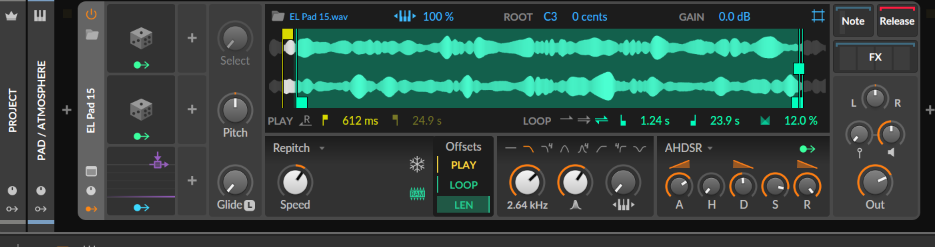
Sample root C3, 0 cents, gain 0.0 dB, playback speed 100%, mode Repitch. The loop is the important part: LEN offset mode, loop region from 1.24 s to 23.9 s with a 12.0% crossfade. That crossfade is what stops the loop point ticking; below about 8% you can hear the seam.
Filter at 2.64 kHz, resonance 24.7%. Amp envelope:
- Attack 612 ms
- Hold 1.00 ms
- Decay 285 ms
- Sustain 87.0%
- Release 10.0 s
A 612 ms attack and a 10-second release means notes overlap for most of a bar at 90 BPM. That's why Voices is set to 24 with voice stacking off, retrigger Always, note priority Last and a steal fade time of 10. Set voices to 8 and the pad chokes itself every time the chord changes.
Output −2.0 dB, pan centred. Two random modulators do the movement:
- Random 1 → sample playhead (amount 0.490). Rate 7.13 Hz, smoothing 100%, unipolar. Full smoothing turns a random generator into a slow drift — it wanders through the sample instead of jumping.
- Random 2 → pan (amount 0.607). Rate 1.00 Hz, smoothing 0%, bipolar. No smoothing here, so it's a stepped per-second reposition rather than a sweep.
There's also an Audio Sidechain modulator on Output at −0.20, which ducks the pad very slightly against the kick. If the modulator system is new to you, I went through it much more slowly in building an evolving ambient loop with only native Bitwig devices.
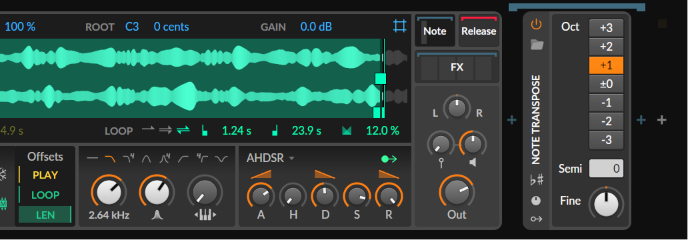
In the Note FX slot, a single Note Transpose at Oct +1:
And the FX slot, which is where the space comes from:

Tool (volume 0.0 dB, gain 0.0 dB, pan centred, width 100%), then EQ+5:
- Band 1 — high-pass at 80.0 Hz, Q 0.71
- Band 2 — +1.2 dB at 428 Hz, Q 0.71
- Band 3 — +12.1 dB at 1.83 kHz, Q 0.71
- Band 4 — +6.5 dB at 4.66 kHz, Q 0.71
- Band 5 — +7.2 dB at 9.76 kHz, Q 0.71
+12 dB is a lot. It's a dull sample and it needs it — check yours before copying that curve.
Then Delay+ (preset EL Delay 8d) and Reverb (preset EL Reverb 10s). Delay is a 1/8 note = 333 ms at this tempo, feedback 52.1%, low cut 238 Hz, high cut 3.08 kHz, blur mode Soft. Reverb is size 200%, pre-delay 38.8 ms, diffusion 96.0%, decay 10.3 s, early/late 39.0%, buildup 72.5%, stereo width 150%, damping 0.73× at 298 Hz and 0.72× at 4.00 kHz.
Track fader: −13.9 dB. The pad is by far the quietest thing in the project; every other instrument sits within a decibel of minus two.
2. Drums — Drum Machine
A single Drum Machine, preset EL Ambient Drums 2, with 14 pads filled from C1 upward:

- C1–D#1 —
EL_kick_009,EL_kick_010,EL_kick_011,EL_kick_016 - E1, F1 —
EL_snare_018,EL_snare_029 - F#1, G1 — deliberately empty
- G#1–B1 —
EL_hihat_009,EL_hihat_010,EL_hihat_011,EL_hihat_014 - C2 —
EL_cymbal_009 - C#2 —
EL_fx_006 - D2, D#2 —
EL_perc_049,EL_perc_053
Four kicks and four hats rather than one of each. Ambient percussion falls apart when every hit is identical, and rotating between four samples does more for the groove than any amount of velocity randomisation — more on that in using drum loops in ambient electronica.
Every pad sits at 0.0 dB, centre — the balance is inside the samples, not on the mixer. Each pad is its own Sampler; the hi-hat shown is a 15.4 ms sample with the amp decay out to 270 ms, filter at 2.64 kHz, loop off, repitch 0%.
Track fader −1.9 dB. Drums run 17–24, 25–32, 33–64 and 73–104 — note the complete absence through the breakdown.
3. Bass — The Grid
The bass is a Poly Grid patch, EL Bass Ramp 1, running in mono (Digi voice mode, 1 voice, retrigger Always, note priority Last).
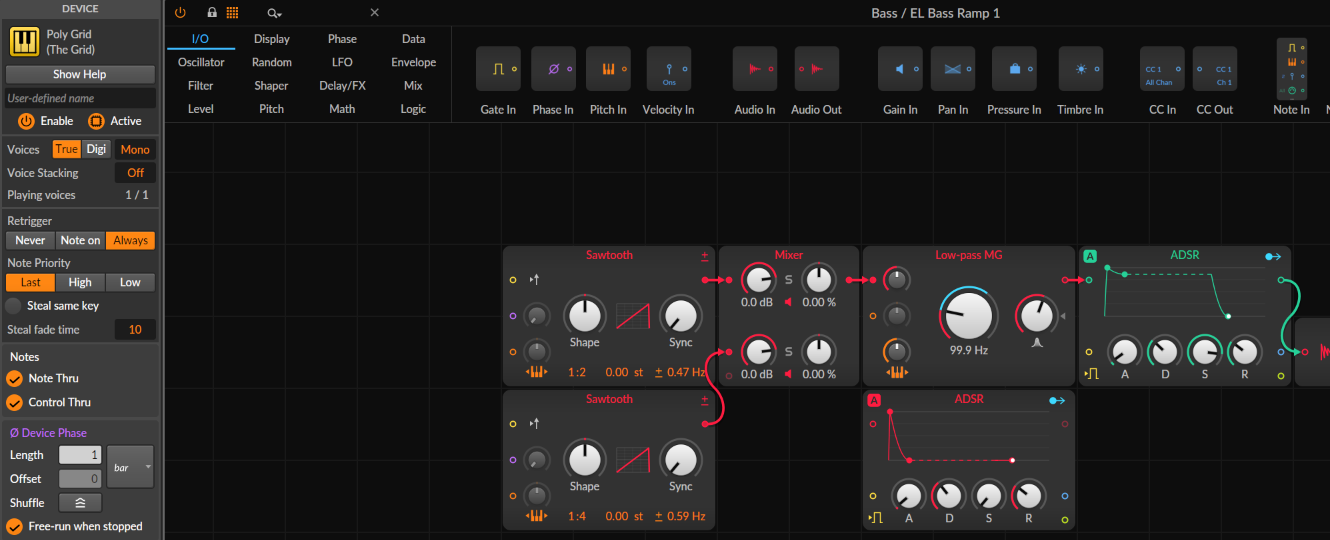
Two Sawtooth oscillators into a Mixer:
- Osc 1 — shape 50.0%, ratio 1:2, drift ±0.47 Hz
- Osc 2 — ratio 1:4, drift ±0.59 Hz
- Both at 0.0 dB, centred
1:2 and 1:4 are one and two octaves down. The tiny detune offsets are deliberately different so the two oscillators never phase-lock.
Into a Low-pass MG at 99.9 Hz, resonance 68.8%, drive 0.0 dB, keytrack 100%. A 100 Hz cutoff on a bass sounds absurd written down; with 69% resonance, the filter itself is providing most of the tone.
Amp ADSR: 1.00 ms / 300 ms / 85.0% / 244 ms. A second ADSR drives the filter. Ramp and a Random module both target cutoff (20.33 and 41.67 respectively) with a third static offset at 32.00, so the filter is never sitting still.
The Grid's FX slot:

EQ+5 with only one band doing anything: +7.5 dB at 62.7 Hz, Q 0.45. Bands 2–5 sit flat at 400 Hz, 1.31 kHz, 3.60 kHz and 12.0 kHz, parked there so I can reach for them without adding a node.
Delay+ set to three eighth-note beats, blur mode Soft. Reverb in Hall mode, size 99.3%, pre-delay 4.00 ms, decay 3.07 s, damping 0.65× at 298 Hz and 1.35× at 4.00 kHz. Half the pad's room, and almost no pre-delay — the bass should feel like it's in the space, not sitting in front of it.
4. Lead / Melody — Polymer, wavetable
Polymer, preset EL Lead WT1. This is the busiest patch in the project.
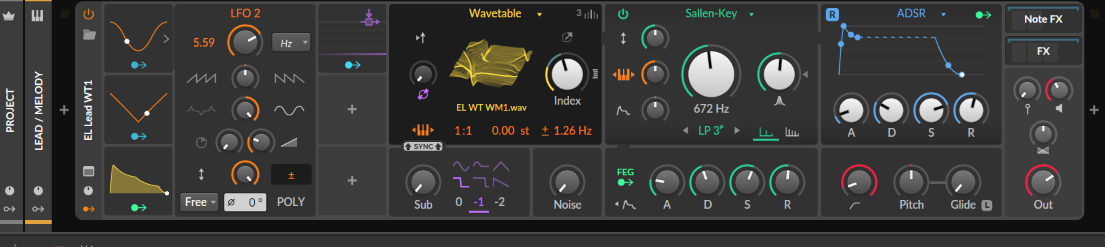
Oscillator is Wavetable on EL WT WM1.wav, ratio 1:1, drift ±1.26 Hz, wavetable index 44.0%, unison 3 voices at 19 cents, sub oscillator one octave down, noise off.
Filter is Sallen-Key, LP 3-pole, cutoff 672 Hz, resonance 63.0%, drive 0.0 dB, keytrack 100%, symmetric nonlinearity. Amp ADSR: 10.2 ms / 184 ms / 75.8% / 1.37 s.
Modulation is where this one lives:
- LFO 1 → wavetable Index, amount 0.475 — the timbre never settles
- LFO 2 → Pitch, amount 0.600. Rate 5.59 Hz, free-running, curve 100%, fade-in 149 ms. The fade-in is the detail that makes it read as vibrato rather than as a wobble — short notes get none of it.
- Segments → Cutoff, amount 38.67
- Audio Sidechain → Output, −0.27
Voices are stacked 2, retrigger on Note on, note priority High, steal-same-key enabled. Perform page output −3.4 dB.
The Note FX chain is two devices, and the second one is the one I'd argue for hardest:
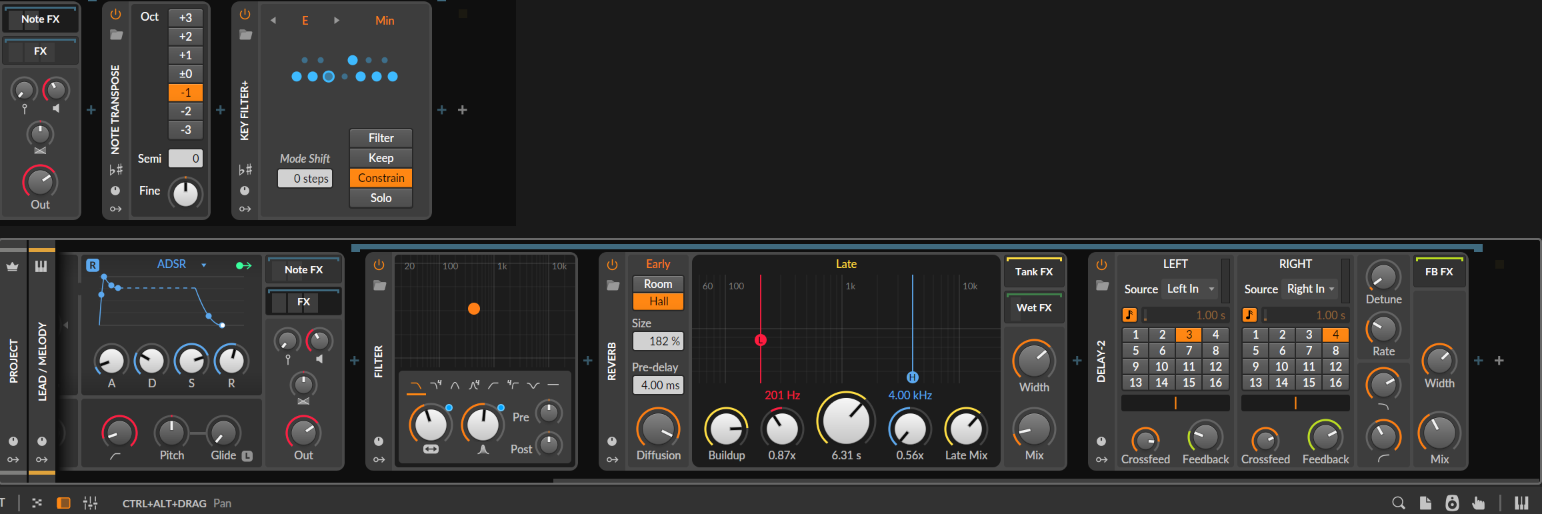
Note Transpose at Oct −1, then Key Filter+ set to E Min in Constrain mode with 0 steps of mode shift. Constrain doesn't mute out-of-key notes, it pulls them to the nearest in-key note. Combined with the transpose, that means I can play or draw anything at all and it lands in E minor an octave down. For a melody line you're improvising over a fixed harmonic bed, this is worth more than any synth parameter on the page.
FX slot: a Filter on an XY pad, a Reverb (Hall, size 182%, pre-delay 4.00 ms, decay 6.31 s, damping 0.87× at 201 Hz and 0.56× at 4.00 kHz), and a Delay-2 with the left channel reading Left In on step 3 of 16 and the right reading Right In on step 4 of 16, both at 1.00 s, with independent crossfeed and feedback per side. Mismatched left and right divisions are what make the lead feel wide without any stereo widening.
Two automation lanes were recorded onto this track — Frequency and Resonance of EL Lead WT1 » FX » Filter — plus a Pitch Offset lane on the Wavetable:

Those curves weren’t drawn in the editor — they were recorded. Automation write armed, the section running, and me moving the filter in real time against what was already playing. That’s why they wander the way they do: the shape follows the take, not the grid, and you get the tiny overshoots and uneven slopes that a mouse-drawn ramp never has. It’s also why they’re dense through Main A and Main B and flat everywhere else — I only played the sections that needed it.
If you want the same thing, it’s worth recording the pass with the whole arrangement audible rather than the lead soloed. Half of what your hand does is reacting to the drums.
Track fader −2.5 dB.
5. Sequence — Polymer pluck plus arpeggiator
Polymer again, preset EL Pluck 2.

Sawtooth oscillator, shape 48.7%, ratio 1:1, drift ±0.14 Hz, sub at 0, noise off. Low-pass MG at 799 Hz, resonance 57.8%, drive +1.5 dB, keytrack 83.0%, cutoff mod +20.40 st.
The envelope is the whole sound: attack 3.61 ms, decay 125 ms, sustain 0.00%, release 20.4 ms. Zero sustain and a 20 ms release is a pluck by definition — with 20 st of envelope-driven cutoff on top, every note is a short bright click that collapses instantly.
Voices 12, stacking off, steal-same-key on, steal fade 10. Modulators: Classic LFO → oscillator Shape (−0.60), Random → Resonance (0.268), Vibrato → Pitch (0.500), plus Pressure, Timbre, Velocity and Release Velocity routed into the patch.
Note FX: Note Transpose Oct +1 into an Arpeggiator — 2 octaves, mode R (random), 1/8 straight, 8 steps. Velocity is flat at 80.0%; gate length is 100% globally but drawn per step, with steps 2, 5 and 7 pulled right down. That per-step gate pattern is what stops a random arp sounding like a metronome — the note lengths carry a rhythm even though the pitches don't.
Track fader −1.9 dB.
There are no sends in this project
There are two effect tracks in the arranger, EL Delay 8d and EL Reverb 10s, and in this project both are muted. Every delay and reverb you've read about above lives inside the instrument, in its own FX slot.
That's not the textbook approach and it costs CPU. What it buys is that each instrument carries its own space — the pad gets a 10.3-second hall, the bass gets a 3.07-second one, the lead gets 6.31 seconds with a completely different damping curve. On a shared send they'd all have to agree. And when I drag the pad into another project, its space comes with it.
The returns stay in the project because when the mix needs one glue reverb across everything, the presets are already sitting there.
The three tracks I left empty on purpose
Eight instrument tracks — seven from Trellis, one I added. This build fills five of them. Keys / Chords, Sample Chops / FX and Field Recordings still hold their placeholder clips and no instruments, which is why the arrangement has gaps at bars 1–8 and 65–72 that currently sound emptier than they should.
That's deliberate for the video. Five instruments is already a long session, and those three are a different kind of work — sample selection and field recording rather than synthesis. They'll get their own build. Everything above is enough to get the track standing up. If you want to fill the Keys / Chords track before I get to it, the Multi Note and random modulator approach drops straight into that slot.
Questions
Do I need Trellis to follow this? No. Every value in this post is a Bitwig setting you can dial in by hand, and you can build the same 120-bar skeleton yourself with an hour and some patience. What Trellis saved me was that hour — and, more usefully, it forced the section decisions out of me before I could hide in sound design.
What exactly does Trellis output? A single .dawproject file. Bitwig opens it with File → Open, same as any project. Inside: the genre's tracks in order with their names and colours, section markers, clips split and staggered across those sections and named by bar range, tempo, time signature, mixer volume and pan, and a production note in each track's inspector. The clips contain placeholder notes to show density, not music.
Does it work for anything other than ambient? There are eighteen genres across four families — Ambient, Chill / Electronic, Psy / IDM and Wellness. AE1 came out of Chill Ambient; pick Psydub or IDM / Glitch and you get a genuinely different section list and track list, not the same skeleton relabelled.
Trellis is one HTML file? Yes. You save trellis.html somewhere and double-click it. No installer, no account, no network requests — it runs offline and writes the file in your browser.
Where do I get it? shop.etherloops.com/b/eZay6.
Why 90 BPM? Because 1/8 notes land at 333 ms, which is a comfortable delay time, and because a 10-second reverb tail at 90 BPM covers about three and a half bars. Both numbers get used above.
The pad EQ has +12 dB on one band. Is that a mistake? It's specific to that sample, which is very dull. Copy the shape, not the gain.
Why is the pad 12 dB quieter than everything else? Because it's running continuously for 120 bars with a 10-second tail. Anything that never stops has to sit low or it becomes the mix.
Can I get the project file? Not yet. The samples aren't all mine to redistribute. The settings above are complete enough to rebuild it.
What to take from this
Build the arrangement first. It doesn't matter whether you generate it, sketch it with empty clips, or drop six markers on a blank timeline — what matters is that the question "what happens at bar 33" is answered before you open a synth.
Then the sound design has somewhere to go. A 612 ms attack is a good decision when you know the pad has to carry eight bars alone. A random modulator on the sample playhead is a good decision when you know that pad runs for five minutes. Neither decision is available to you in an eight-bar loop.
Every number in this post came after the structure existed. That's not a coincidence, and it's the only part of this build I'd insist you copy.
Get Trellis
Trellis is the Bitwig arrangement builder I used to generate the AE1 skeleton — the six sections, the seven tracks, the staggered entries and the 40-odd named clips you've been looking at all the way down this page. Pick one of eighteen genres, set a length, press Generate; it writes a .dawproject that Bitwig opens directly. One HTML file, no install, no account, works offline.
It won't design your sounds. It will make sure you have somewhere to put them.
→ Get Trellis at shop.etherloops.com
EtherLoops builds production tools for ambient, chill, and atmospheric music makers. Browse more at etherloops.com.