How to Write an Ambient Melody Over Your Own Chords (Without Guessing at Notes)
The pad loop is fine. It's the melody track that's still empty at 1 AM. Here's how to stop hunting for notes one at a time.

It's late, and the pad loop has been going round for twenty minutes. That's the problem — it still sounds good. Four chords, a slow filter, plenty of reverb. It could loop forever, and it will, because nothing ever arrives on top of it.
So you open a piano roll on an empty track. You draw a note. You delete it. You draw three more, hear them against the chord underneath, and they are technically in key and completely characterless. You try again an octave up. Twenty minutes later the pad is still looping and the melody track is still empty.
This is not a talent problem. It's a search problem. Over four chords in a seven-note scale there are millions of note sequences that count as "in key", and almost all of them are dull. Hunting for the good ones one note at a time, by ear, at 11 PM, is the slowest possible way to find them.
Why the top line is the part that stalls
1. "In key" is not the same as "in the chord"
Scale membership is a very low bar. Every note of A natural minor is available over every chord in A natural minor, and most of them sound like nothing in particular. The notes that carry a chord's identity are its 3rd and its 7th — the colour tones. A line that leans on those sounds like it means something; a line that wanders across roots and 5ths sounds like a scale exercise, even though nothing is technically wrong.
2. Voice leading is invisible in a piano roll
Melodies feel intentional when consecutive notes move by small steps, and when each chord change is met by the nearest available tone rather than a leap. This is easy to hear and almost impossible to see. You are looking at rectangles on a grid while the thing that actually matters is the distance between them and how that distance lands against a chord that just changed underneath.
3. You're running two searches at once
Every note you draw is two decisions: which pitch, and when. Drawing by hand forces both at once, so a rhythm you like gets thrown out because its pitches are wrong, and a phrase you like gets thrown out because it sits badly in the bar. Separate the two and each becomes tractable.
4. You can't audition alternatives fast enough
By the time you've drawn a second version you've forgotten how the first one felt. Melody writing is a comparison task, and comparison needs candidates side by side, in seconds, not in minutes.
Enter Driftline
Driftline is a melody maker: you give it a chord progression, it writes the line. It's a single HTML file — save it anywhere, double-click, and it opens in your browser. No installation, no account, no subscription, and after the download it never touches the network again. Your sessions and saved progressions live in your own browser's storage.
It was built for ambient and meditative lines first — sparse, breathing, well-voice-led — but every control is exposed, so it writes busy, wide-range lines in any style just as happily.
Two ideas do most of the work.
A genre preset configures the whole generator in one click. Pick Psybient or Jazz and the tempo, scale, time signature, chord voicing, contour, note rate, register, all four shaping sliders and a chord progression land together, idiomatically. Each preset holds a pool of values rather than one fixed setting, so choosing the same genre again gives a different but stylistically consistent starting point.
Every chord Driftline offers is in your scale, by construction. Chords are built by stacking scale steps rather than fixed semitone intervals — so a wrong note isn't merely discouraged, it's unavailable. That's what lets five-note pentatonics, six-note whole-tone and eight-note diminished scales run through the same machinery as ordinary major and minor.
Writing an ambient line, start to finish
Here's the whole thing on one worked example: a slow psybient loop in A minor. Follow along and you'll have exportable MIDI in about ten minutes.
Step 1 — Start from a genre, not from zero
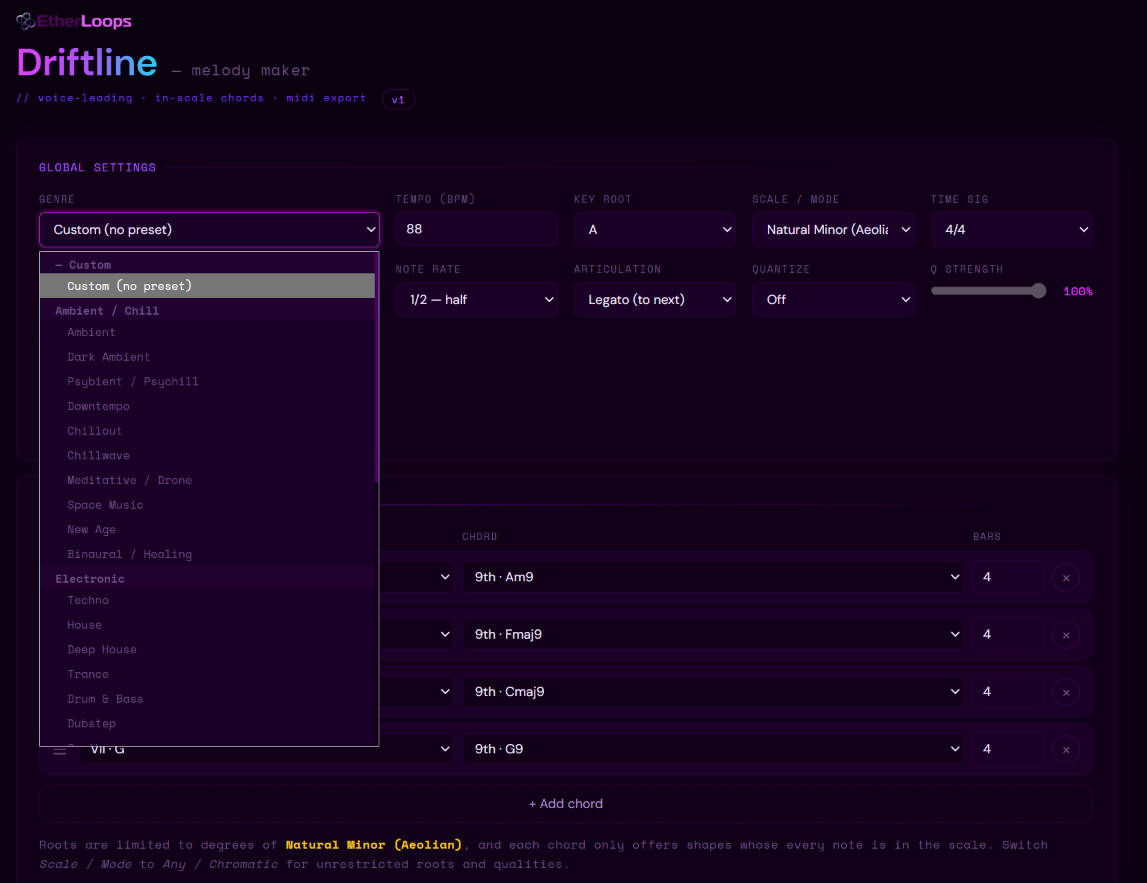
Open the Genre dropdown and pick Psybient / Psychill. Thirty-five presets sit in there across seven families — Ambient/Chill, Electronic, Hip Hop/R&B, Rock/Metal, Jazz/Blues, Classical/Cinematic and World — and any of them will set the entire board in one click, progression included.
Press the same preset again and you get a fresh take on the same style. Do that three or four times before you touch anything else; it costs nothing and it's the cheapest idea generator in the app.
Step 2 — Fix the key and the mode
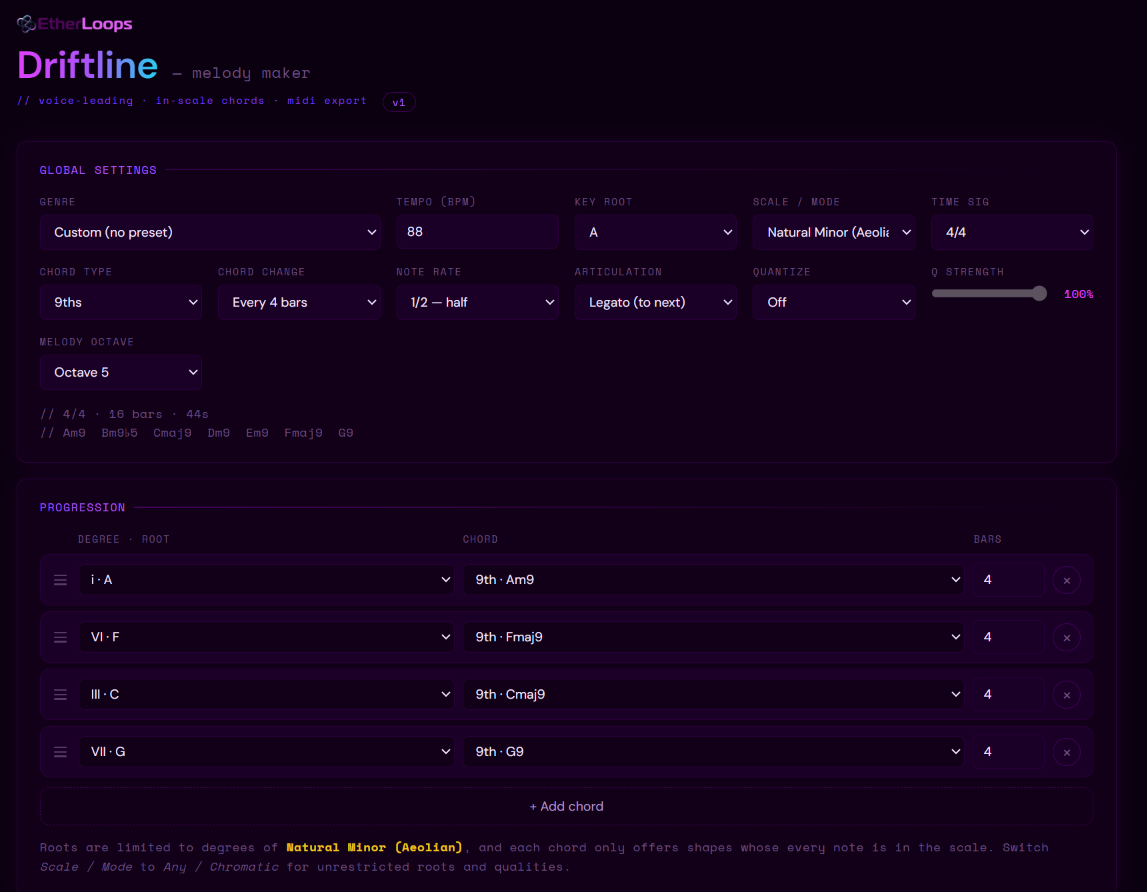
Set Key root to A and Scale to Natural Minor (Aeolian). All 17 key spellings are there and scales are spelled correctly for the key you choose, so F major shows B♭ rather than A♯ — a small thing that stops the chord list reading like a typo.
Changing the scale by hand flips the genre label to Custom, because the setup is no longer the preset's. That's expected, not an error. Everything the preset set is still in place.
Under the panel Driftline prints the chord list for your current key and voicing. That line is worth reading every time you change something — it's the quickest confirmation that you're working with the harmony you think you are. Modes are mood, incidentally: the same progression in Dorian, Lydian and Phrygian gives three genuinely different feelings, and there are 21 scales here, so don't default to major and minor out of habit.
Step 3 — Enter the harmony you actually have
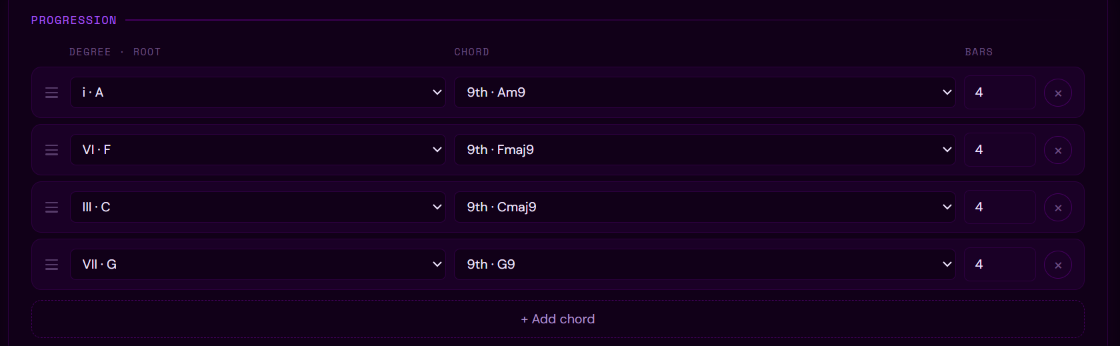
The Progression panel is one row per chord, built entirely from dropdowns — there's nothing to type. Each row has a Degree · root (labelled by function and note, like I · C or vi · A), a Chord voicing with the resulting chord named, and a Bars length.
Set Chord type to 9ths to stamp the whole progression at once, then build i – VI – III – VII. In A minor with 9ths that gives you Am9 – Fmaj9 – Cmaj9 – G9. Set Chord change to every 4 bars and drop the tempo to 88 BPM: sixteen bars, about forty-four seconds, which the information line confirms for you.
Because roots are stored as scale degrees rather than note names, that i–VI–III–VII stays a i–VI–III–VII in every key and every mode. Transpose to F♯ minor, or switch the scale to Dorian, and your harmonic shape survives — the progression is re-fitted, not discarded.
Step 4 — Decide the rhythm before you decide the notes
This is where the two-searches-at-once problem gets solved, and it's the step most people rush.
Note rate sets how often notes can occur: Free (16ths), where density alone decides placement, or absolute values from 1/1 down to 1/16. Absolute is the important word — 1/4 is a quarter note in every meter, not a quarter of the bar, and the grid re-aligns to each bar line so odd meters stay tidy instead of drifting.
Articulation sets how much of its slot each note fills: Legato holds until the next note begins, Exact plays exactly one note value, Staccato is short and detached. The two are independent, which is the entire point of splitting them:
| Note rate | Articulation | What you hear |
|---|---|---|
| 1/1 | Legato | held whole notes, one per bar |
| 1/1 | Staccato | short stabs a whole note apart |
| 1/8 | Legato | running eighths, joined |
| 1/8 | Staccato | running eighths, detached |
For this track: rate 1/2, articulation Legato. Two slots per bar, each note stretching to meet the next. That single pair of settings is most of what makes a line sound ambient rather than busy.
One warning: with Legato, notes stretch to meet whatever comes next, so a 1/2 rate and a 1/4 rate can sound almost identical. Switch to Exact for a moment to actually hear the value you picked.
Step 5 — Shape the line
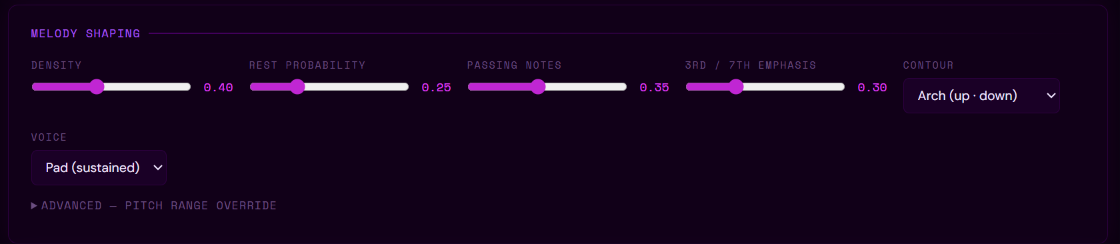
Four sliders and a contour. Unlike the global settings, these don't regenerate on the spot — set as many as you like, then commit with Generate or Variation.
Density is the proportion of available slots that become notes. Rest probability is the chance a would-be note is dropped. They're a pair: density decides how full, rests carve gaps back out. If maximum density still feels sparse, lower the rests rather than fighting the density.
Passing notes widens the pool from chord tones to the whole scale. It's gentler than the number suggests — because the scale contains the chord tones, raising it only permits a non-chord tone rather than forcing one. 3rd / 7th emphasis pulls the other way, weighting the pick back onto the tones that carry the chord's colour.
Those two controls fight, and knowing by how much saves a lot of slider-wiggling. Every figure below is the share of non-chord tones you end up with:
| Passing notes | Emphasis 0.0 | Emphasis 0.5 | Emphasis 1.0 |
|---|---|---|---|
| 0.20 | 10% | 7% | 5% |
| 0.50 | 23% | 15% | 11% |
| 0.80 | 35% | 24% | 16% |
If you want audibly more colour, raise Passing and lower emphasis. Raising one alone mostly cancels out.
Contour is the shape of the line across the whole progression: Arch, Valley, Ascending, Descending, Wave, Pendulum, Zigzag or Random. Pick Arch and set Melody octave to 5 — a two-octave band up where a pad won't crowd it.
Step 6 — Roll, lock, vary
This is the heart of the app, and it's two buttons.
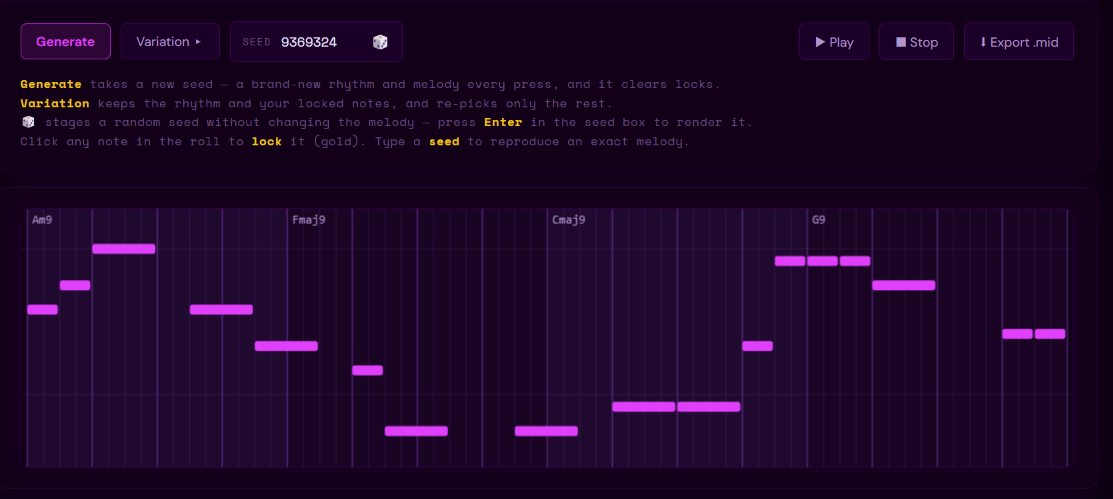
Generate takes a fresh random seed and writes a completely new melody — new rhythm, new pitches. Press it until something grabs you. It clears any locked notes, by design.
Variation advances the seed by one and re-picks only the unlocked notes, keeping the rhythm and every note you kept. Click any note in the piano roll to lock it; it turns gold. Locked notes survive Variation — and, crucially, they feed the voice-leading of their neighbours, so the new notes lead smoothly into and out of the ones you kept.
So: Generate until you have a take with one good bar in it. Lock that bar. Press Variation. Lock what improved. Repeat. In practice a line usually converges in five or six passes, and the result is genuinely yours — you chose every note that survived.
Every melody is seeded, so the same seed with the same settings always gives the same line. Write down the seed of a take you love and you can return to it exactly, on any machine.
Step 7 — Export, and drop it into Bitwig
Hit ⬇ Export .mid and you get a Standard MIDI File at the current tempo. The filenames are self-describing, so a folder of takes tells you what's in it and successive exports never overwrite each other:
Driftline_Amin_Am9-Fmaj9-Cmaj9-G9_88bpm_12345.mid
Driftline_Ephrygian_E5-A5-Bno3b5_170bpm_7-8_666.mid
Key and scale, the chord symbols, the tempo, the time signature when it isn't 4/4, and the seed. Because the seed is in the name, the file tells you exactly how to reproduce it.
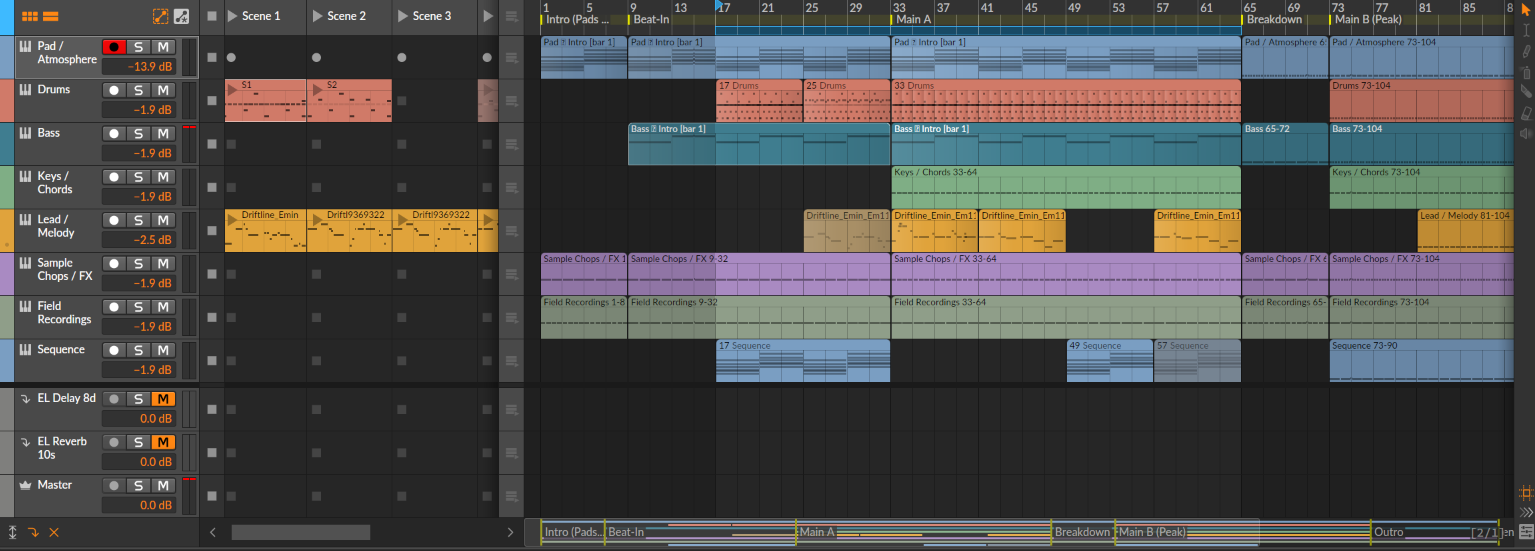
Drag it onto a MIDI track in Bitwig and it imports as a clip. Assign a pad, a pluck, whatever the track wants. The same works in Ableton Live, FL Studio, Logic, Cubase, Reaper, Pro Tools and GarageBand — it's a standard .mid file, nothing exotic.
One practical note: some DAWs ignore the embedded tempo and time signature on import. If the melody plays at the wrong speed, or a 7/8 line looks scattered against 4/4 bars, set the project tempo and meter by hand.
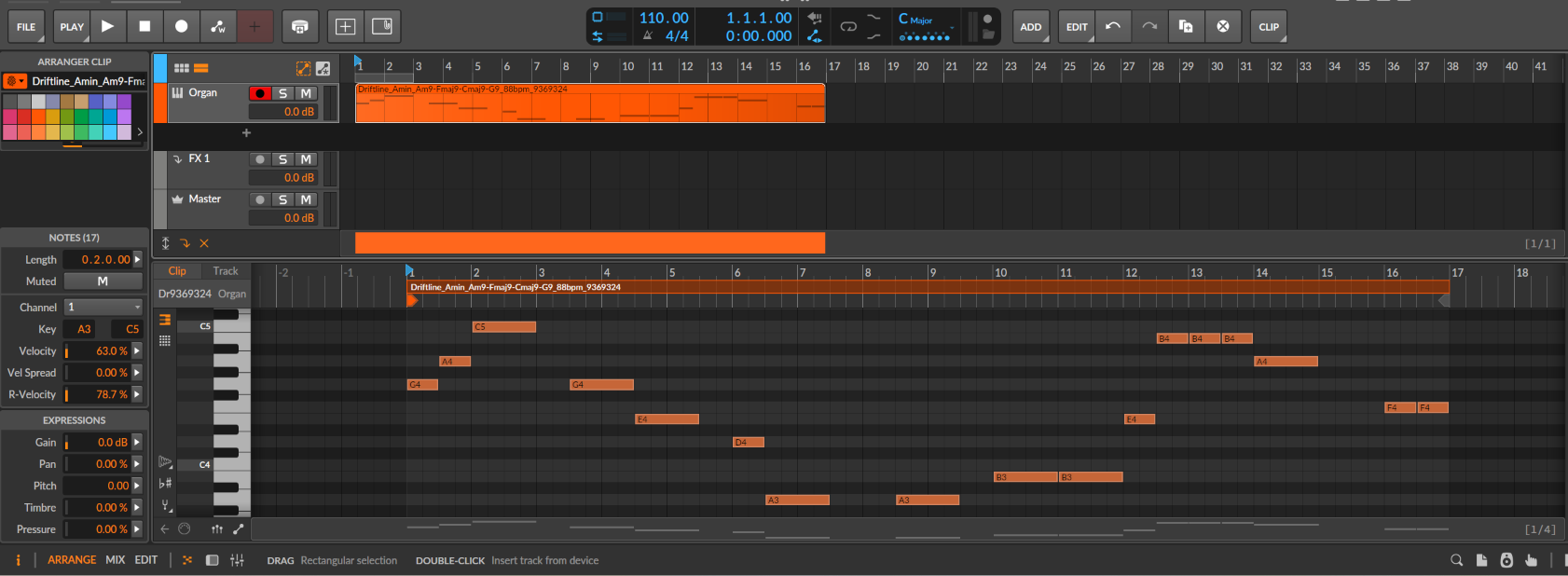
Driftline_Amin_Am9-Fmaj9-Cmaj9-G9_88bpm_9369324 — key and scale, the chords, the tempo and the seed, all in the name.What Driftline doesn't do
Worth stating plainly, because knowing the edges makes the middle more useful.
It writes one line, not an arrangement. Driftline is monophonic by design — a single melodic voice over your harmony. It doesn't write chord parts, basslines or counterpoint, and it doesn't produce multiple tracks. If you need the structure around the melody, that's a different job; the arrangement builder walkthrough covers it.
It can't read your existing MIDI. It's generative — it writes MIDI from your chords. It doesn't import, analyse or re-harmonise a file you already have.
Every exported note has the same velocity. Driftline writes pitch and timing; you shape dynamics in your DAW after import. For slow ambient lines this rarely matters, but on anything with a plucked or percussive instrument you'll want to pass over the velocities.
The Voice setting is preview only. Pluck, Harp, Marimba, Bell and Pad are there so you can audition in the browser. None of them are exported — your DAW instrument decides the sound.
Saves live in your browser, and don't sync. Saved progressions are in local storage, which means a different browser, a different profile or a different machine starts empty, and clearing browsing data erases them. There's no cloud, by design. Use Export .json to back them up or carry them to another computer — the import merges rather than overwrites, so nothing you already have gets clobbered.
Two things worth knowing once you're past the basics
A melody you love is just a number. The seed is reproducible and it's in the export filename. Note it alongside the key, scale, meter and chord settings and you can rebuild that exact line anywhere, months later — more portable than any project file.
Short scales cannot be wrong. Minor Pentatonic and Japanese (In) have five notes, and because chords are stacked from scale steps, everything built in them is idiomatic by construction. If you're stuck, a five-note scale is the fastest route to a line that sounds deliberate. The same logic makes odd meters cheap — 5/4 and 7/8 need no extra work, since accents and bar lines follow automatically.
Who this is for
- Ambient, psybient and chill producers who want a melodic starting point instead of a blank piano roll
- Producers who know exactly what chords they want but stall on the top line
- Anyone who wants to write in Lydian, Phrygian Dominant or Hungarian Minor without hand-checking every note
- Wellness and meditation creators who need original, royalty-free MIDI
- Sound designers and composers sketching motifs against a fixed harmony
It also slots neatly into a chain: write the progression in Ether Harmony, take the melody from Driftline, and play it through a pad you built yourself in Surge XT.
FAQ
Do I need an internet connection? No. The first load fetches a webfont; after that everything works offline. The generator, playback and export never touch the network.
Do I need to know music theory? No. The chord rows are labelled by function and by note, so you can work by ear and pick up the theory by osmosis. Every chord offered is in your scale already.
I pressed Generate and it cleared my locked notes. That's intended — Generate is a fresh start with a new seed. Use Variation to keep your locks.
Variation did nothing. If every note is locked there's nothing left to re-pick. Variation also never moves notes, only re-pitches them, so if you're watching note positions it can look inert even when it worked.
A chord voicing I want is greyed out. Voicings have to fit the scale. A 13th needs six distinct pitch classes, so it doesn't exist in a five-note scale, and Driftline falls back to the nearest voicing that does rather than offering a chord that isn't really there. Switch to a seven-note scale for the full set of nine.
The melody hugs the middle of a wide range. Smooth voice leading moves stepwise, so over a wide range the line traverses rather than leaps. Pick a directional contour such as Ascending or Arch, or narrow the range. Give it at least an octave either way — a very narrow band produces an almost flat line, which is expected.
My exported MIDI looks unquantized. Note starts are always on a 1/16 grid. Three things make an export look ragged anyway: Staccato deliberately shortens note ends, a DAW ignoring the time signature will show a 7/8 line against 4/4 bars, and a clip dropped somewhere other than a bar line offsets everything. Use the Quantize control if you want a coarser or triplet grid.
Can I use the MIDI commercially? Yes. The MIDI you export is yours — no royalties, no attribution.
Give it your chords. It writes the melody.
The blank top line isn't a shortage of ideas. It's a shortage of candidates — and candidates are exactly what a seeded generator produces, twenty at a time, all voice-led and all in key. Lock what works, re-roll the rest, export, and get back to the part of production you actually opened the DAW for.
Driftline is available now on the EtherLoops shop. One payment. Lifetime access. Single HTML file, PDF manual, all 35 genre presets, 21 scales and 9 chord voicings unlocked, unlimited exports.
→ Get Driftline at shop.etherloops.com
EtherLoops builds production tools for ambient, chill, and atmospheric music makers. Browse more at etherloops.com.